
- Starting price
- Free
- Free tier
- Yes
- Platforms
- iOS · Android · Web companion
- Developer
- Bible Hub
- Launched
- 2004 (web) / mobile app years later
- Updated
- May 24, 2026
The verdict
Bible Hub has quietly become the favorite of self-taught Bible students who refuse to pay for study software. The mobile app is a faithful pipe to the website's enormous library of translations, interlinears, lexicons, and public-domain commentaries - clunky in places, but genuinely free, and genuinely deep.
Try Bible Hub ↗Opens biblehub.com
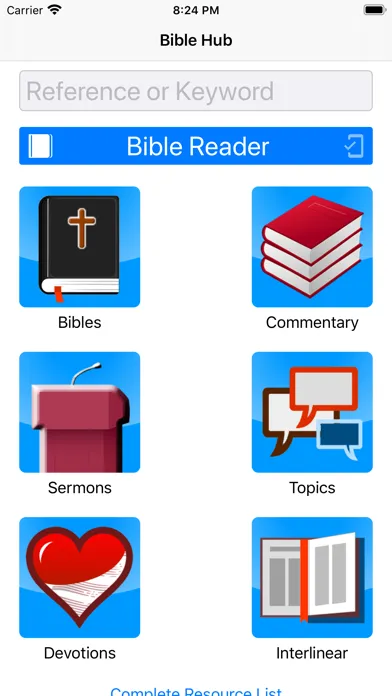
Bible Hub is not a polished consumer app. It is a mobile front end for one of the largest free Bible-study websites on the internet - a site that has been quietly aggregating translations, lexicons, interlinears, cross-references, and out-of-copyright commentaries since 2004. If you have ever Googled a verse and landed on a page with thirty translations stacked vertically and a row of clickable Hebrew words at the top, you have used Bible Hub. The app is that experience, in your pocket.
It is not pretty. It does not try to coach you. It does not gamify your reading streak. What it does is give you the kind of cross-referenced, original-language, multi-commentator workspace that used to require a $400 software purchase - and it gives it away for free, with no account, no upsell, and no premium tier. That tradeoff (depth over polish, breadth over hand-holding) is the entire pitch.
For the right reader, the tradeoff is extraordinary. The wrong reader will uninstall it within ten minutes and go back to YouVersion. This review is for people trying to figure out which of those two readers they are.
✓ The good
- Genuinely free and genuinely deep - no account, no paywall, no premium commentary IAP, ever
- 30+ English translations in a single parallel view - KJV, NKJV, ESV, NIV, NASB, NLT, CSB, NET, BSB, plus dozens of older and less-common ones side by side
- Strong's-tagged interlinear on every verse - tap any English word to surface the underlying Hebrew or Greek lemma, transliteration, and gloss
- Eight to ten classical commentaries per verse - Matthew Henry, Pulpit, Barnes, Gill, Jamieson-Fausset-Brown, Cambridge, Ellicott, Meyer, Benson, and more, stacked vertically
- Topical Bible and exhaustive cross-references built in - Treasury of Scripture Knowledge integrated at the verse level
- Mobile app mirrors the website almost completely - the same library, the same depth, just reformatted for a phone screen
- Excellent for sermon prep on the go - pastors and teachers can pull commentary stacks while waiting for a meeting
✗ Watch out
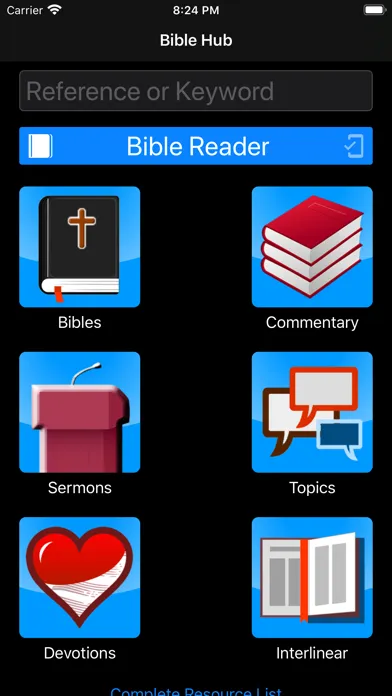
- UI is dated and dense - feels like a wrapped website because, functionally, it is one
- Most modern translations are display-only or via web fallback - the heavy classical/public-domain catalog is the real strength
- No reading plans, no streaks, no social features - this is a reference tool, not a daily-devotional companion
- Offline support is limited compared to Olive Tree or Logos - many features require a connection
- Search and navigation can feel like using a desktop site through a phone - not always thumb-friendly
- No native note-taking or highlighting that syncs across devices (yet) - bring your own journal
Best for
- Self-taught Bible students who want Logos-level depth without the price tag
- Pastors and Sunday school teachers prepping a verse-by-verse lesson
- Readers who want to compare 10+ translations of the same verse in one tap
- Anyone curious about the underlying Hebrew or Greek but unwilling to learn the languages
Avoid if
- You want a streak-and-plan devotional rhythm - use YouVersion or Dwell instead
- You need a beautiful, polished reading experience - Olive Tree is friendlier
- You want active modern scholarship - most commentaries here are 19th-century public domain
- You read primarily offline on flights or in low-coverage areas - pick a dedicated offline app
What Bible Hub is
Bible Hub is a free Bible-study reference platform - a website first, with iOS and Android apps that surface most of the same data on mobile. The project began in 2004 as a parallel-translation viewer and grew, year over year, into a sprawling library: dozens of English translations, the Berean Standard Bible (the site's own commissioned translation), a Strong's-numbered interlinear for every verse in both testaments, multiple Hebrew and Greek lexicons, the Treasury of Scripture Knowledge cross-reference set, a topical Bible, and roughly a dozen classical English commentaries.
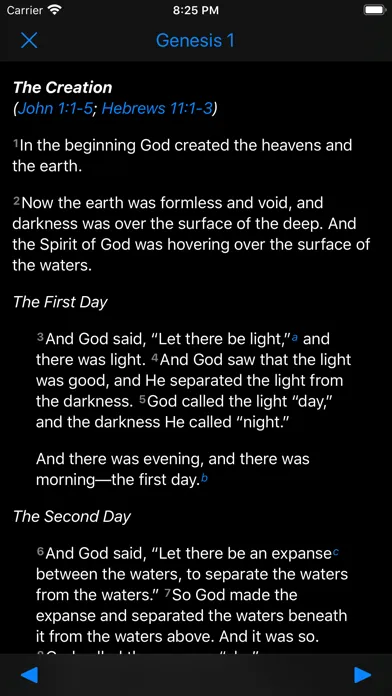
The mobile app is a thinner skin over that same database. Open a verse and you get the verse text, a row of translation toggles, a tap-through to the interlinear, and a long scroll of commentary entries from public-domain expositors. It is the opposite of a curated experience - everything is on the page, and you decide what to read.
Why serious self-study readers prefer Bible Hub
The single biggest practical difference between Bible Hub and a consumer app like YouVersion is what happens when you tap a verse. In YouVersion you get a sharing menu and maybe a verse image. In Bible Hub you get a research workspace: ten or more parallel translations, the Greek or Hebrew underneath each English word, eight commentators arguing with each other across two centuries, the cross-references, the topical entries, and a lexicon entry for any word you tap. That is the experience Logos Bible Software sells for hundreds of dollars. Bible Hub gives it away.
The catch is that Bible Hub does not hold your hand. There is no "where do I start" wizard, no progress tracker, no curated reading plan to nudge you back. It assumes you already have a question - a verse you are studying, a word you are tracking, a passage you are preparing to teach - and it hands you the tools. That is exactly what a serious self-study reader wants, and exactly what a casual devotional reader finds overwhelming.
30+ translations in a single parallel view - the killer feature
Open any verse in Bible Hub and tap the "Parallel" view. What you get is a vertical stack of the same verse in roughly thirty English translations - KJV, NKJV, ESV, NIV, NASB, NLT, CSB, NET, BSB (the site's own Berean Standard Bible), HCSB, Amplified, plus a long tail of older and less-common renderings like Young's Literal, Darby, Webster, the Geneva Bible, and Wycliffe. Each line is the same verse, formatted identically, so the eye can scan down the column and instantly see where translators differ. For a verse like Proverbs 22:6 or Romans 8:28, the variation is genuinely illuminating - you can see which translations are smoothing the Hebrew, which are preserving the awkwardness, and which are pushing toward a particular reading.
This sounds like a small thing. In practice it is transformative. Most readers who have only ever used one translation do not realize how much interpretive work their translation is doing on their behalf - and seeing thirty side by side is the fastest way to internalize that. It is also enormously useful for teachers. If you are preparing a lesson on a contested verse, a thirty-translation parallel view tells you in about ten seconds where the interpretive pressure points are. No other free mobile app puts this much translation breadth in front of you with this little friction.
Interlinear with Strong's tagging - original languages without learning them
Tap the "Interlinear" view on any verse and Bible Hub shows you the underlying Hebrew or Greek word for word: the lemma, the transliteration, the parsing, the Strong's number, and a short gloss. Tap any Greek or Hebrew word and you jump to its lexicon entry - Strong's Concordance, Thayer's Greek Lexicon, or Brown-Driver-Briggs for Hebrew - with the full definition, related entries, and a list of every other verse where that same word appears. From there you can hop verse to verse through the entire concordance trail. It is the kind of word-study workflow that used to take a stack of physical books and an afternoon. Here it takes about three taps.
For readers who have never studied biblical languages - which is most of us - this is the closest thing to language fluency you can fake. You will not learn Greek by tapping through Bible Hub. But you will start to notice things you could not see in English: that the same Greek word is being translated three different ways in your favorite Bible, that a Hebrew root keeps recurring across an Old Testament chapter in a way the English flattens, that a key theological term has a narrower semantic range than the sermon implied. Once you start noticing those things, you cannot un-notice them - and the app makes the noticing nearly effortless.
The commentary stack - eight classical voices per verse
On every verse, Bible Hub renders a long vertical scroll of commentary entries from a rotating cast of classical English expositors. The regular lineup includes Matthew Henry's Complete Commentary, the Pulpit Commentary, Albert Barnes' Notes, John Gill's Exposition, Jamieson-Fausset-Brown, the Cambridge Bible for Schools and Colleges, Ellicott's Commentary for English Readers, Meyer's NT Commentary, Benson's Commentary, and several others. For most verses you will see eight or more entries stacked one after another, each from a different voice and a different century. They frequently disagree with each other, which is itself instructive - you can watch a Puritan, an Anglican, a Scottish Free Church Presbyterian, and a 19th-century American Reformed pastor work through the same verse and reach different emphases.
The honest tradeoff is that this is almost entirely 19th-century material. There is very little here from the last hundred years, and nothing from contemporary scholarship - no N.T. Wright, no John Walton, no Beth Allison Barr, no contemporary Catholic, LDS, or Orthodox commentators. That is a function of copyright, not curation. The flip side is that you are getting the complete texts of commentaries that, in print, would fill a wall of your study. Pastors and teachers regularly tell us this commentary stack alone is the reason they keep the app installed. It is the easiest way to triangulate a verse against centuries of careful reading without buying anything.
Pricing
Bible Hub App
Free
The entire library - translations, interlinear, Strong's, commentaries, topical index, cross-references - at no cost. No account required. No premium tier. No commentary IAPs.
Donations
Optional
Bible Hub is supported by reader donations through the website. Nothing in the app is gated behind giving - donating is purely voluntary and does not unlock any features.
Bible Hub is free. Genuinely, completely free. There is no premium tier, no upgrade path, no commentary unlock IAP, no subscription nudge after thirty days. The library you see is the library you get, and the only ask is an optional donation through the website.
This puts Bible Hub in a strange and welcome category. Most apps that look this deep - Logos, Accordance, the paid Olive Tree commentaries - cost real money, sometimes hundreds of dollars across a library. Most apps that are truly free - YouVersion, Bible Gateway's app - keep their original-language and commentary depth fairly shallow on purpose. Bible Hub and Blue Letter Bible are the two big outliers: serious-study tools that have stayed free across two decades.
The economics work because the project leans on public-domain content. The classical commentaries, Strong's, Thayer's, BDB, the older translations - none of those carry licensing fees. The Berean Standard Bible is the site's own commissioned translation, released into the public domain. Modern translations that do carry licensing (NIV, ESV, NASB, CSB) appear in display contexts negotiated with the publishers. That mix is why the app can stay free where Logos and Accordance cannot.
Most users do not need anything beyond what is in the free app. If you reach the point where you genuinely outgrow Bible Hub - you want contemporary scholarly commentaries, a unified note system, sermon-building tools, and tight desktop integration - that is when Logos or Accordance start to make sense. Until then, the free tier is the answer.
Where Bible Hub falls behind
No modern academic commentaries. The commentary stack is deep and excellent but mostly 19th-century. If you want NICOT, NICNT, the Word Biblical Commentary, the New International Greek Testament Commentary, or any contemporary critical scholarship, you will need Logos, Accordance, or a seminary library. Bible Hub will not get you there.
No real reading-plan or devotional layer. There are no streaks, no day-by-day plans inside the app, no community features, no verse-of-the-day push. If you need scaffolding to read every day, Bible Hub will not provide it. Most users pair it with a devotional app - YouVersion for plans, Bible Hub for study.
Offline support is patchy. Some translations and lookups work offline, others quietly require a connection. Power users on planes or in spotty coverage tend to keep Olive Tree or Logos installed alongside Bible Hub for that reason.
The UI is dated. It is functional, it is dense, and it is clearly built by people who care more about content than about design. After Olive Tree or Dwell, the typography and tap targets feel old. None of that affects what the app can do - but it does affect whether a new user gives it the ten minutes it takes to learn the layout.
No native cross-device sync for notes or highlights (yet). If you highlight or annotate, you are largely doing it on your own and storing it elsewhere. This is the single biggest gap between Bible Hub and a paid suite like Logos, which treats your notes as a first-class persistent layer across devices.
Bible Hub vs. Blue Letter Bible vs. Olive Tree
Bible Hub and Blue Letter Bible are the two free heavyweights for serious mobile Bible study. They overlap heavily - both offer Strong's-tagged interlinears, multiple translations, classical commentaries, lexicons, and concordance tools, all without a paywall. Choosing between them is mostly a matter of taste. Blue Letter Bible has a slightly more polished mobile UI, better audio integration (Alexander Scourby, David Suchet, Dramatized NIV), and a cleaner verse-by-verse "Bible in basic English" reading view. Bible Hub has a wider parallel-translation view (thirty-plus translations stacked at once vs. roughly a dozen), a deeper classical commentary roster, and a more aggressive cross-reference and topical-Bible layer. Most serious self-study readers end up with both installed.
Olive Tree is a different kind of product. Different strengths. The free Olive Tree app is more polished, more thumb-friendly, and offers excellent reading typography, but its real depth (the Word Biblical Commentary, NICOT, NICNT, the major modern reference works) sits behind paid in-app purchases, often $30-$80 per resource. So Olive Tree is the right pick if you are willing to pay for modern academic commentaries and want a beautiful daily-reading experience. Bible Hub is the right pick if you want the maximum free depth and do not mind a dated UI. Blue Letter Bible sits in the middle: free, polished, slightly less deep on commentaries than Bible Hub.
A reasonable mobile stack for someone serious about Bible study, who does not want to pay Logos prices, is: YouVersion for daily reading and plans, Bible Hub for parallel translations and the commentary stack, and Blue Letter Bible for audio and quick original-language lookups. All three are free. Together they cover almost every workflow short of full-blown sermon building.
The bottom line
Bible Hub is the thoughtful person's free Bible-study app. It is not pretty, it does not coach you, and it will not nag you into a streak - but it puts thirty translations, a Strong's-tagged interlinear, eight classical commentaries, and the full Treasury of Scripture Knowledge cross-reference set in your pocket for nothing. If you are doing real study, teaching a class, or preparing a sermon, install it tonight. Pair it with YouVersion for plans and Blue Letter Bible for audio, and you have a free mobile study stack that genuinely rivals what cost hundreds of dollars a decade ago.
Alternatives to Bible Hub
 Bible PortalA free Bible and reference portal with more than 50 classic commentaries, dictionaries, devotionals, maps, sermons, and topical tools.
 Blue Letter BibleThe other major free serious-study app. Slightly more polished UI, excellent audio Bibles, similar depth on Strong's and lexicons, slightly fewer translations in the parallel view.
 Olive TreeBeautiful free reader with a deep paid commentary store. Right pick if you want modern academic commentaries (NICOT, NICNT, WBC) and a more polished daily-reading experience - but they are paid IAPs.
 Logos Bible SoftwareThe gold standard for sermon prep and serious study, with unified notes, modern scholarly commentaries, and original-language tools. Costs real money - base packages from a few hundred dollars.
 YouVersionThe everyday reading and devotional app. Pair it with Bible Hub: YouVersion for plans, streaks, and community, Bible Hub for depth when you have a question.
Frequently asked questions
Is the Bible Hub app actually free?
Yes - completely. No account is required, there is no premium tier, and no commentary or lexicon is locked behind an in-app purchase. The project is supported by optional donations through the website, and nothing in the app is gated behind giving.
How is Bible Hub different from Blue Letter Bible?
They are the two best free serious-study apps and they overlap heavily. Bible Hub leans into breadth - thirty-plus parallel translations, a deeper classical commentary stack, more cross-reference tooling. Blue Letter Bible has a slightly cleaner mobile UI and stronger audio Bible integration. Most serious self-study readers keep both installed.
Does Bible Hub include modern commentaries like NICOT or N.T. Wright?
No. The commentary library is almost entirely 19th-century public-domain material - Matthew Henry, Pulpit, Barnes, Gill, Jamieson-Fausset-Brown, Cambridge, Ellicott, Meyer, and similar. For contemporary scholarly commentaries you will need Logos, Accordance, Olive Tree's paid commentary store, or a seminary library.
Can I really study Greek and Hebrew with Bible Hub?
You will not learn the languages from tapping through the app. But the Strong's-tagged interlinear, paired with Thayer's and BDB lexicons, lets you do word studies, trace lemmas across the canon, and check translations against the underlying text without ever conjugating a verb. For most self-taught readers that is exactly the right level of access.
Does Bible Hub work offline?
Partially. Some translations and reference tools work offline, but several features quietly require a connection to fall back to the website. If consistent offline access matters - flights, low-coverage areas, missions trips - pair Bible Hub with a fully-offline app like Olive Tree or Logos.
Is Bible Hub a Protestant resource?
The commentary library is dominated by 19th-century English-language Protestant expositors, simply because that is what is in the public domain. The translations span the full range of widely-used English Bibles. The Berean Standard Bible - the site's own commissioned translation - is in the public domain and aims for accuracy across traditions. Readers from other traditions can still get enormous use out of the parallel translations, interlinear, lexicons, and cross-references.
Should I use the app or the website?
For depth, the website. The desktop version of BibleHub.com shows more on screen at once and is faster for the deepest study sessions. The app is the right tool when you are away from a computer - sermon prep on the train, looking up a verse during a small group, checking a Strong's entry while reading in bed. They share the same underlying library.
Sources & further reading
More Bible Reading Apps
 Concise BibleConcise Bible arranges selected Scripture passages, introductions, images and audio into a short path through the biblical story in sixteen app languages—a generous free introduction that should lead into the whole Bible, not be mistaken for it.
 SoapBox Super AppSoapBox combines a multilingual Bible, original-language helps, prayer, journaling, sermons, church management, giving, community and ORA AI in one fast-moving platform—but that breadth also concentrates unusually sensitive spiritual and organizational data.
 Sword of the SpiritSword of the Spirit turns Bible reading into an indie role-playing campaign with armor, virtues, enemies, quests and comprehension battles—an imaginative free experiment whose early-access reliability and data documentation still need work.
 FJN – Find Jesus NowFind Jesus Now packages a Bible reader, notes, audio, AI explanations, testimonies, sermons and studies around an evangelism mission—but much of the experience is a live web service with unresolved ad and privacy contradictions.
 BibleShelfBibleShelf replaces deadline-heavy plans with a gentler book-by-book tracker, synchronized web access, an ESV reader and simple memory verses—but it is still a young, English-only tool with little study guidance.
 Bible Speed ReadA focused RSVP reader that can make a familiar chapter feel newly immediate, with thoughtful pacing controls and offline support—but only NIV and ESV are currently confirmed, and speed is not the same as understanding.