- Starting price
- Free for donors; ~2.9% + $0.30 per donation
- Free tier
- Yes
- Platforms
- iOS · Android · Web
- Developer
- Givelify, LLC
- Launched
- 2013
- Updated
- May 24, 2026
The verdict
Givelify is the giving app donors actually want to open. It is the cleanest donor-side experience in the category, even if the church-side dashboard is thinner than Tithe.ly or Pushpay.
Try Givelify ↗Opens givelify.com
Givelify has quietly become the favorite of donors who give to more than one church. If you tithe at your home congregation, drop something in at a friend’s church when you visit, and occasionally support a missionary or a campus ministry, Givelify is the app you end up living inside - because every one of those organizations is probably already on it.
It does not try to be a full church management suite. It does not try to be the back-of-house ChMS your pastor logs into on Monday morning. It does not try to compete with Planning Center for volunteer scheduling or with Subsplash for branded apps. Givelify’s entire posture is "we are the donation moment, and we are going to make that moment so frictionless that you actually give what you meant to give."
The result is an app with a 4.8-star average across the iOS and Android stores from roughly a million donor reviews - numbers no other giving platform comes close to. More than 60,000 churches and nonprofits in the United States now accept gifts through it. For a category that most people think of as a boring back-office line item, that level of donor affection is genuinely unusual, and it is the single most important fact about Givelify as a product.
✓ The good
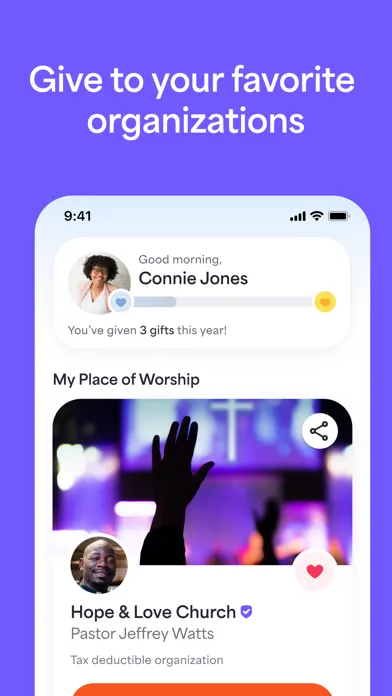
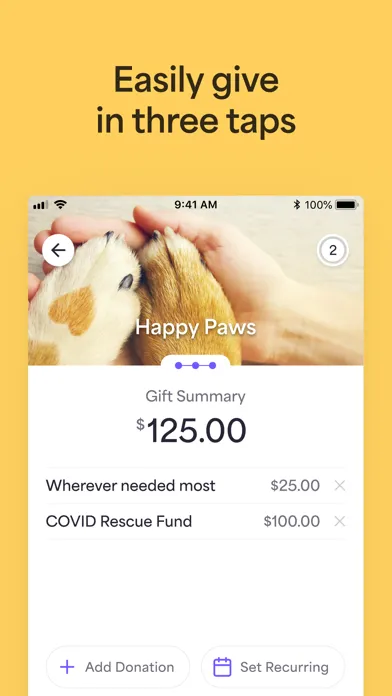
- Best-in-class donor experience - the giving flow is three taps from open to confirmation, and donors actually finish it
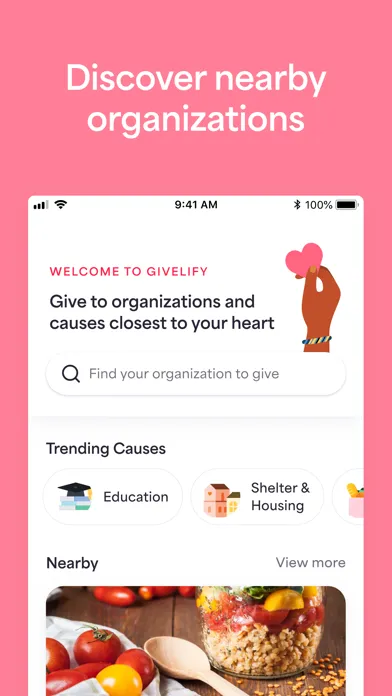
- Find-any-church discovery - geolocation and search surface 60,000+ organizations, so visitors and travelers can give without asking for an envelope
- Tax-ready receipts built in - every gift logs to a donor history view and annual statements export in one tap at year-end
- Recurring giving is a first-class flow - weekly, biweekly, monthly, or per-paycheck schedules with easy edit and pause
- No cost to the church to receive - churches sign up free; donors can even choose to cover the processing fee at checkout
- Multiple funds per church - donors can split a single gift across tithe, missions, building, and youth in one transaction
- Apple Pay, Google Pay, card, and bank - payment-method coverage is wide, which is why completion rates are so high
✗ Watch out
- Thin church-side analytics - the giving dashboard is functional but nowhere near what Pushpay or Tithe.ly surface for finance teams
- No full ChMS - there is no people database, no groups, no check-in, no events; pair it with Planning Center or similar
- Processing fees are not the cheapest - 2.9% + $0.30 is industry-standard but smaller churches sometimes find ACH-heavy competitors cheaper at scale
- No native text-to-give in the base product (yet) - competitors built that into the core; Givelify leans on the app and web
- Limited integrations - exports to QuickBooks and a handful of ChMS platforms, but the ecosystem is narrower than Tithe.ly’s
- US-centric - coverage outside the United States is limited, which matters for international missions orgs
Best for
- Donors who give to more than one church
- Churches that want a giving app without committing to a full ChMS
- Visitors, travelers, and college students
- Small to mid-size congregations
Avoid if
- You need an all-in-one church management platform
- You want deep donor analytics and segmentation
- You are a non-US organization
- You need a branded white-label church app
What Givelify is
Givelify is a mobile-first donation platform - a free app for donors and a free dashboard for churches and nonprofits, with a per-transaction processing fee that funds the company. Donors open the app, find a church by name or location, pick a fund, type an amount, and confirm with Face ID or a thumbprint. Money is deposited into the church’s bank account within a few business days, and the donor gets an instant receipt that lands in a tax-ready history view.
On the church side, an administrator signs up at givelify.com, verifies the organization’s nonprofit or church status, links a bank account, and starts receiving gifts within roughly a week. The church-side dashboard shows incoming donations, donor lists, fund totals, and basic reporting - enough for most small and mid-size congregations, though larger churches with full-time finance staff usually pair it with QuickBooks or a separate ChMS.
Why donors actually open Givelify
Every other giving platform in this category was designed for the church staff first and the donor second - the assumption being that the church picks the tool and the donor lives with whatever they get. Givelify inverted that. It built the donor app first, made it good enough that donors started asking their churches to sign up, and let demand pull the church-side acquisition. That is why the app store reviews look the way they do. Donors are not reviewing a giving tool they were told to use; they are reviewing a tool they chose.
In practice, this shows up everywhere. The giving flow is three taps. The fund picker has icons. The amount keypad is huge. The confirmation animation is satisfying - a designer somewhere clearly cared about how it felt to give. None of that matters to the church’s finance team, and it would not be in the product if Givelify had been designed for them. But it is exactly what makes the difference between a donor who means to give $50 a week and one who actually does.
Donor-first UX: the differentiator that built the company
The Givelify giving flow is genuinely one of the most polished payment experiences in any consumer app, religious or otherwise. Open the app and you land on your home church. Tap "Give." Choose a fund - tithe, missions, building, whatever the church has set up, each with a recognizable icon. Type an amount on a full-screen numeric keypad. Confirm with Face ID, Touch ID, or a passcode. A green check animates, a receipt drops into your history, and you are done. Three taps, maybe ten seconds.
This sounds like a small thing. In practice it is transformative. The brutal truth of digital giving is that completion rate is everything - a flow with two extra screens loses 20-40% of intended donations to abandonment. By stripping the giving moment down to the absolute minimum, Givelify pushes completion rates well above what most church platforms achieve, which is the real reason churches that switch to it tend to see giving go up rather than just flat-transferring from envelopes. The donor wanted to give the whole time. The app just got out of the way.
Donation receipts and tax tracking: the year-end killer feature
Every gift you make through Givelify - whether to your home church, a friend’s church, a campus ministry, or a one-time visitor gift - logs to a single Donor History view. The history is filterable by year, by organization, and by fund, and every entry includes the date, amount, payment method, and a permanent record of which charity received it. At year-end, you can pull a consolidated annual statement covering every organization you gave to, in a format that is acceptable to the IRS and to your tax preparer.
For anyone who has spent a January digging through envelope stubs, Venmo screenshots, and church-by-church emails trying to assemble a charitable-giving total, this alone is worth the install. It is also the reason a lot of donors who started using Givelify for one church end up routing all of their giving through it - including to organizations that also offer their own giving page. The consolidated tax view is a soft moat the church-side competitors mostly do not have, because they each only see the giving that happens on their own platform.
Church discovery: find any church, give to any church
The Givelify app has a search and a map. Type the name of a church and it surfaces every one on the platform that matches. Open the map and it shows the churches near you. Tap one and you can give immediately - no signup at that specific church, no email verification, no waiting for a portal invite. With 60,000+ churches and nonprofits on the platform, the practical effect is that you can give to almost any congregation in the United States from the same app you use for your home church.
This matters more than it sounds. Visitors who attend a friend’s wedding at an unfamiliar church can give without an envelope. College students can support both their home church and the campus ministry they actually attend on Sunday. Travelers can drop something at the church they visit on vacation. Donors supporting a missionary or a relief campaign can give without leaving the app they already trust. The network effect - donors want the app because every church is on it; churches want the app because every donor is on it - is exactly the dynamic that kept Givelify ahead of platforms that focused on the church side first.
Pricing
Donors
Free
Donors pay nothing to download, search, or give. They can optionally cover the processing fee at checkout, but it is never required.
Churches & Nonprofits
Free to join
Organizations pay no monthly fee, no setup fee, and no contract. Sign-up is free; the only cost is the per-transaction processing fee taken out of each gift.
Per-transaction fee
~2.9% + $0.30
Roughly 2.9% plus 30 cents per donation, regardless of payment method. Donors can elect to cover this fee so 100% of the gift reaches the church.
Givelify’s pricing is the cleanest in the category. Free for donors. Free for churches to join. The company makes money on a per-transaction processing fee of roughly 2.9% plus 30 cents - the same range Stripe and Square charge for general-purpose payments.
There is no monthly subscription, no setup fee, no contract, and no minimum volume. A small church that takes $200 in gifts one month pays the fee on that $200 and nothing else. A church that takes nothing pays nothing.
Donors can choose to cover the fee at checkout - a checkbox on the confirmation screen - which is a small detail that adds up. A meaningful percentage of donors elect to cover it, especially recurring givers, which means most well-engaged churches receive close to the full face value of donations even after fees.
Most users do not need to think about pricing at all. The donor sees free. The church sees free to sign up. The fee comes out of each gift transparently and is itemized on the church’s deposit reports.
Where Givelify falls behind
Thin church-side analytics. The dashboard tells you what came in, from whom, to which fund, and when. It does not slice donors into cohorts, surface lapsed-donor alerts the way Pushpay does, or model giving against attendance the way larger enterprise platforms do. For a church with a full-time data person, that is a gap.
No native text-to-give in the base product (yet). Donors give via the app or the church’s web page. Competitors like Tithe.ly built text-to-give into the core flow; Givelify has experimented here but it is not the headline feature. For older congregations where SMS is the dominant channel, that matters.
Narrow integration ecosystem. There are exports to QuickBooks and connections to a handful of ChMS platforms, but Tithe.ly and Subsplash have spent years building deeper hooks into church-side tools. If your church already runs on a particular ChMS, check the integration list before assuming Givelify will sync cleanly.
No branded church app. Subsplash and Pushpay both sell white-label church apps where giving is one tab of a larger experience. Givelify is Givelify - donors give inside the Givelify app, with Givelify branding. For some churches that is fine; for others it is a dealbreaker.
US-only in practice. International coverage is limited. If your organization receives meaningful gifts from outside the United States, this is not the platform.
Givelify vs. Tithe.ly vs. Pushpay
These three are the platforms most churches actually evaluate. They overlap heavily on the surface and differ significantly underneath.
Givelify is the donor-first option. It won the consumer side of the market by building the cleanest giving flow and the only true cross-church donor app. If your priority is "people will actually finish the gift" and "donors can track all their giving in one place," Givelify is the answer. Church-side tooling is intentionally minimal.
Tithe.ly is the church-first option in the small-to-mid-size segment. It bundles giving with a basic ChMS, text-to-give, a church-app builder, a website builder, and email tools - a small-church operating system rather than a giving app. The donor flow is fine, not magical. The package is the value.
Pushpay is the enterprise option. It targets larger churches with thousands of givers, sophisticated finance teams, and dedicated comms staff. Donor analytics, integrated giving statements, ChurchStaq bundle with Resi and Church Community Builder - it is a heavier, more expensive, more powerful system. Smaller churches will find it overkill; multi-site churches running real budgets often consider nothing else.
Different strengths. Givelify is better at the donor moment. Tithe.ly is broader (church app, ChMS, website, email). Pushpay is deeper (analytics, enterprise reporting, multi-site).
The bottom line
Givelify is the donation app donors actually like, and that fact alone is worth more than any feature spec. If your church wants a giving solution that congregants will pick up on their own - that they will use to give to your church, to other churches, to missions, and to whatever else - and you do not need a full church management suite bolted to it, Givelify is the obvious pick. Pair it with Planning Center or your existing ChMS for the back-of-house work, and you have a setup that respects the donor and stays out of the way.
Alternatives to Givelify
 Tithe.lyChurch-first giving platform bundled with a basic ChMS, app builder, and website tools. Broader feature set, smaller donor moment.
 Planning CenterThe dominant church operations suite - people, services, groups, check-ins, registrations. Giving is one module among many.
 PushpayEnterprise giving and engagement platform aimed at larger and multi-site churches. Deep analytics, heavier price tag.
 SubsplashBranded church-app builder with giving, media, and messaging built in. Strong if you want a custom-branded congregation app.
Frequently asked questions
Is Givelify really free for churches?
Yes. Churches and nonprofits pay nothing to sign up, nothing monthly, and nothing to receive donations beyond the per-transaction processing fee of roughly 2.9% plus 30 cents that comes out of each gift. There is no contract or minimum.
How much does Givelify charge donors?
Donors pay nothing to download or use the app. At checkout, donors can optionally choose to cover the processing fee so the church receives the full intended amount, but covering the fee is never required.
How long does it take for donations to reach the church?
Donations typically deposit into the church’s linked bank account within a few business days of the gift. The church-side dashboard shows the status of each deposit and itemizes the processing fees taken out.
Can donors give to any church on Givelify?
Yes. Any donor can search for and give to any of the 60,000+ churches and nonprofits on the platform, regardless of whether it is their home church. This is one of the main reasons donors install the app.
Does Givelify provide tax receipts?
Yes. Every gift logs to a permanent donor history view, and donors can export consolidated annual statements at year-end covering all organizations they gave to through the app. The format is suitable for tax filing.
How does Givelify compare to Tithe.ly?
Givelify is donor-first and giving-only with a stronger consumer app. Tithe.ly is church-first and bundles giving with a small-church operating system - basic ChMS, text-to-give, app builder, website tools. Many churches that need only giving prefer Givelify; churches that want one vendor for many tools prefer Tithe.ly.
Does Givelify replace a church management system?
No. Givelify focuses on the donation moment and does not include people records, groups, check-in, events, or volunteer scheduling. Most churches pair it with Planning Center, Breeze, or a similar ChMS for the rest of operations.
Sources & further reading
More Church Management Software
 B1 ChurchA genuinely free, open-source church platform - app, website, giving and check-in on one database - run by an Oklahoma nonprofit. The catch is not the price - it is that the vendor own docs call the native app deprecated.
 Involv Chat (church.chat)Involv Chat combines ministry-team messaging, rosters, blocked dates and service scheduling in a focused church workspace—useful when leaders protect volunteer consent and resist turning attendance or gifts data into a spiritual score.
 Pastor Notes AppA two-app system that lets leaders publish sermon notes and invite live congregational response while attendees use the free Bible Notes companion—but its pricing math, refund terms and app privacy disclosures need correction before a church commits.
 Take RootA low-cost, offline-friendly relationship tracker built specifically for evangelism and discipleship follow-up—more intentional than a spreadsheet, but its old generic privacy policy does not adequately describe the sensitive ministry data the product exists to hold.
 ChurchSoftwareChurchSoftware—formerly StoreHouse—offers an unusually broad church-management core for $0, including giving, check-in, accounting and a shared mobile app, while charging transparently for vendor-heavy extras.
 Develop.MeDevelop.Me packages course building, cohorts, discussion, assignments, gamification and mobile learning for churches and mission-driven organizations—with unlimited learners on paid plans, but a vague free tier and a 2022 website privacy notice leave procurement questions open.