- Starting price
- Free, then ~$14/mo per module
- Free tier
- Yes
- Platforms
- Web · iOS · Android
- Developer
- Planning Center
- Launched
- 2006
- Updated
- May 24, 2026
The verdict
The #1 church management platform in the US for a reason - Services alone is worth the subscription, and the modular pricing means small churches can run on it for almost nothing. The trade-off is a learning curve that hits new admins hard in the first month.
Try Planning Center ↗Opens planningcenter.com
Planning Center has quietly become the favorite of church staff who actually have to make Sundays happen. Worship pastors plan the set list and route it to the band. Children's ministry directors run check-in screens for 400 kids before the 9am service. Connection pastors track which first-time guest came back for week two. The single biggest practical difference between Planning Center and the church-database software it replaced is that Planning Center is built around the job, not around the record.
It does not try to be your livestream platform. It does not try to be your church app builder. It does not try to be your sermon prep tool. It does the boring operational backbone - people, services, groups, check-ins, giving, calendar - and it does each one well enough that ten thousand churches have stopped looking.
The catch - because there is always a catch - is that Planning Center is nine separate products glued together by a shared People database. You pay per module, the UI conventions shift slightly between them, and the first month is genuinely confusing for a new admin who has only ever used a single-pane competitor. Stick with it past that ramp and the modularity becomes the selling point: you only pay for what you actually use.
✓ The good
- Best-in-class worship planning - Services has been the industry-standard scheduling tool for worship teams for over a decade
- Truly modular pricing - every module has its own free or low tier, and a 50-person church can run the whole stack for under $30/mo
- People is genuinely free up to 250 people - not a 14-day trial, not "free for one user," actually free
- The Church Center member app is included with any paid module - your congregation gets directory, giving, groups, and event sign-ups in one place
- Strong mobile apps for staff - Services and Check-Ins on iOS/Android are full-featured, not afterthoughts
- Open API and Zapier integrations - your data is not trapped, and most ChMS-adjacent tools speak Planning Center natively
- Customer support and documentation are unusually good for the category - the help center is searchable and actually answers the question
✗ Watch out
- Learning curve is real - new admins routinely need two or three weeks before the module model clicks
- Nine separate products means nine separate sets of settings - global preferences would help
- Pricing scales by attendance, so growing churches can see surprising jumps when they cross a tier line
- No first-party livestream or church app builder - you will still need Subsplash, Resi, or similar for streaming
- Giving fees are competitive but not the lowest - Tithe.ly undercuts on raw processing rates
- Reporting across modules is thinner than it should be for the price - cross-module dashboards are limited (yet)
Best for
- Churches of 100-2,000 attendance who need real worship scheduling
- Multi-staff teams that want one shared people database
- Small church plants starting on the free tiers
- Children's ministries running real check-in workflows
Avoid if
- You want an all-in-one app with church-branded livestream
- You need a single login that does everything in one screen
- You're a 30-person house church with no paid staff
- Your only need is online giving and nothing else
What Planning Center is
Planning Center is a modular church management system - ChMS, in the category jargon - built by a team in Carlsbad, California that has been shipping the product since 2006. It started as a single worship-scheduling tool (the original "Planning Center Online" for Services) and has since expanded to nine connected modules: People, Services, Groups, Check-Ins, Giving, Calendar, Publishing, Registrations, and Music Stand. All nine share one People database, one login system, and one member-facing app called Church Center.
The product is sold to church staff, not to congregants. Pastors, worship directors, and operations admins manage everything from a web dashboard; volunteers and members interact through Church Center on iOS, Android, or web. There is no on-premise version, no self-hosted option, no perpetual license - it is a SaaS, billed monthly, with per-module pricing that scales by either active people count or weekly attendance depending on the module.
Why church staff prefer Planning Center
The thing church staff repeat about Planning Center is that it was built by people who clearly attended a Sunday service. Services knows that the keyboard player needs the chord chart in a different key than the guitarist. Check-Ins knows that a four-year-old's label needs to print the parent's pickup code at the bottom. Groups knows that the small-group leader will forget to take attendance, so it nudges them. These are not features you would think to specify in a requirements document - they are the kind of thing you only build if you have actually run a Sunday morning.
The other reason it sticks is the data model. One People record carries through every module: when the same person registers for VBS, joins a small group, gives a tithe, and gets scheduled to run the soundboard, it's the same record, the same login, the same Church Center profile. The thoughtful church admin's ChMS is the one that does not make you re-enter your family three times - and that is the model Planning Center respects.
Services: the worship-scheduling killer feature
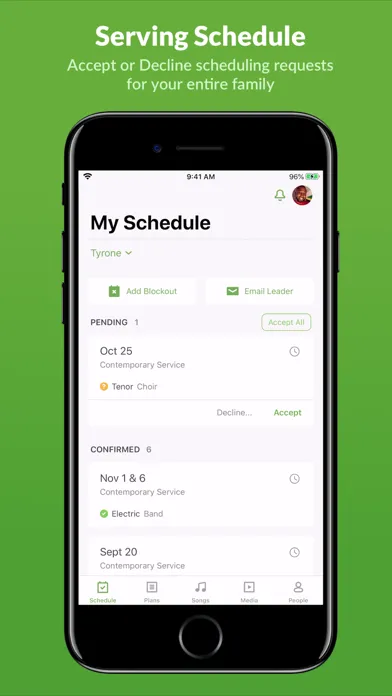
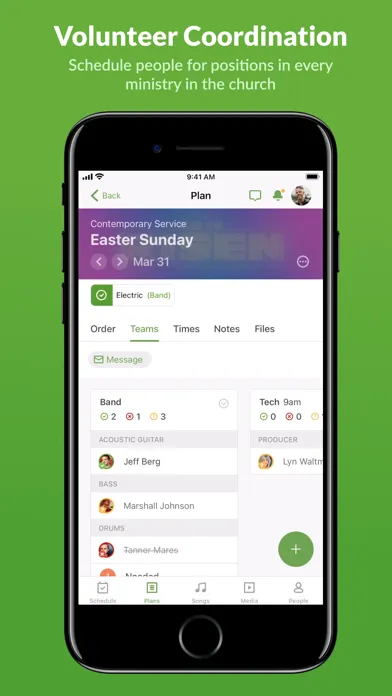
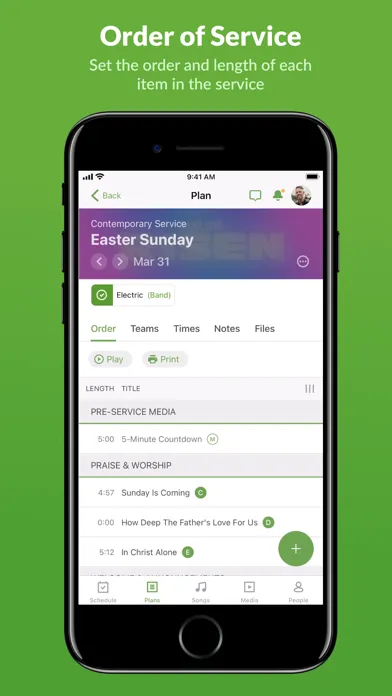
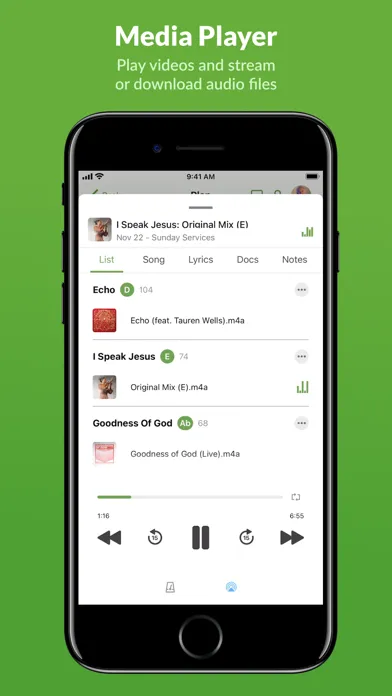
Services is the original Planning Center product and the reason most churches signed up in the first place. It is, in plain terms, the scheduling and run-of-show tool for your Sunday service. You build a service plan - a stack of songs, scripture readings, sermon blocks, and transitions, each with assigned times. You schedule volunteers into positions (lead vocalist, drummer, sound engineer, ProPresenter operator, greeter, usher) and Services automatically emails them, lets them block out unavailable dates, and tracks whether they've accepted. Each song carries its chord chart, MP3, arrangement key, and lyrics, and routes the right key to the right person via the Music Stand app.
This sounds like a small thing. In practice it's transformative. Worship pastors who used to wrangle volunteer schedules in a spreadsheet and email PDFs of chord charts on Friday night get their Sundays back. The team gets clarity on who's playing, what's being played, and in what order - all on their phone - by Tuesday. Music Stand on the iPad replaces a binder of paper for the whole band. There is a reason that even churches who hate the rest of their ChMS will pay for Services as a one-module standalone.
Modular pricing: pay only for what you use
Most church management software is sold as a single bundled subscription - you get every feature whether you use it or not, and you pay one big monthly number. Planning Center went the other way. Each module - People, Services, Groups, Check-Ins, Giving, Calendar, Publishing, Registrations, Music Stand - is its own product with its own price tier, and each one has a free or near-free entry point. A church plant of 40 people can run People + Giving for $0/mo. A 200-person church that only needs worship scheduling can run Services for around $30/mo. A 1,200-person multi-staff church running the full stack lands somewhere between $400 and $800/mo.
The practical effect is that Planning Center scales with you rather than ahead of you. You don't pay for Check-Ins until you actually have a children's ministry that needs check-in. You don't pay for Calendar until your room-booking conflicts force the issue. The cons of the model are real - your monthly invoice has nine line items, your settings live in nine places, and the cross-module reporting could be better - but the alternative is paying a $400/mo flat fee for a five-person staff to use 30% of a bundled product. Most churches will take the line items.
Member-facing apps: Music Stand, Check-Ins, and Church Center
A ChMS lives or dies on whether congregants and volunteers actually use it. Planning Center ships three separate mobile experiences: Church Center for everyone (directory, giving, event signups, groups, sermon notes), Music Stand for the worship team (chord charts in your key, set list, click track, MP3 reference), and Check-Ins on tablets at the kids' ministry door (sticker printer support, parent pagers, security codes). The Services app for volunteers is a fourth - schedules, blockouts, accept/decline, chat with the worship leader - and Headcounts is a fifth for attendance tracking.
Splitting them by audience instead of cramming everything into one mega-app is the right call for a church. The volunteer drummer doesn't need the giving screen; the visitor doesn't need Music Stand. Church Center is the one anyone in the congregation actually installs, and it's included free with any paid module - meaning even churches paying for just Services or just Giving get a real member app thrown in. That alone undercuts the value proposition of half the church-app vendors in the market.
Pricing
People (Free)
Free
Up to 250 people in the database, unlimited users, the full Church Center member app. Genuinely usable as a standalone for a small church.
Single Module
From ~$14/mo
Pick any one module - Services, Groups, Check-Ins, Calendar, Registrations, Publishing, or Music Stand. Pricing scales with attendance or list size.
Typical Mid-Size Church
~$200-$500/mo
Four to six modules across a 300-800 attendance church. Most churches in this band run Services, Groups, Check-Ins, Calendar, and Giving.
Large Multi-Site
$600-$1,000+/mo
Full module stack at 2,000+ attendance with multiple campuses, large volunteer rotations, and high check-in volume.
Giving
2.15% + $0.30 per transaction
Stripe-backed processing on cards; 1% ACH. No monthly platform fee on Giving itself - you only pay processing.
Planning Center's pricing is unusually friendly at the bottom and competitive at the top. People is free up to 250 people with unlimited users and the full member app - most ChMS competitors don't have a free tier at all, much less a usable one.
Each paid module is priced on a sliding scale: Services scales by number of scheduled people, Groups and Check-Ins scale by membership, Registrations scales by event volume. A typical 400-person church running Services, Groups, Check-Ins, and Calendar lands around $150-$250/mo total. Add Giving (no platform fee, just 2.15% + $0.30 processing) and Registrations and you're closer to $300/mo.
A 1,500-person church running every module hits roughly $700-$1,000/mo. That sounds steep until you compare it to legacy ChMS suites like Shelby or ACS, which routinely quote $15,000+ annual contracts for similar functionality.
The one pricing surprise most churches hit is the attendance-tier jumps. Crossing from the 500-attendance tier to the 1,000 tier on a module can add $40-$80/mo in a single jump. Plan the growth, not the bill.
Where Planning Center falls behind
No first-party livestream. Planning Center has no streaming product, no in-app sermon video player, no live-service push. If you want a branded streaming experience you're pairing it with Resi, Subsplash, or Church Online Platform. For many churches this is fine - they already use YouTube or Vimeo - but it's a real gap if you wanted one vendor.
No native church app builder. Church Center is the only app your members get, and it's branded "Church Center" with your church logo inside. If you want a fully white-labeled app on the App Store under your church's name (the way Subsplash and Tithe.ly Apps work), Planning Center doesn't offer that. Some churches care a lot about this; most don't.
Cross-module reporting is thinner than the price suggests. Reporting inside each module is fine. Reporting that joins data across modules - "show me everyone who attended a small group AND gave AND served on a team in the last 90 days" - is harder than it should be. Workarounds exist (Lists in People, exports to a spreadsheet, third-party tools like Church Metrics), but a native cross-module dashboard would close a real gap.
The UI is consistent within a module and inconsistent between modules. Services and Check-Ins were built years apart by different teams and it shows in small ways - buttons in different places, slightly different conventions for filters. None of it is broken, but it's why the first-month ramp is longer than the marketing implies.
Onboarding for non-technical pastors is the weak point. The product assumes you have an operations-minded person on staff who will sit with the help docs for a few hours. A solo pastor at a 60-person church who just wants directory and giving will find Tithe.ly faster to set up - at the cost of giving up the room to grow.
Planning Center vs. Tithe.ly vs. Subsplash
Different strengths. Planning Center is the operational backbone - the tool your staff lives in Monday through Saturday to make Sunday happen. Tithe.ly started as a giving platform and has expanded outward into a lightweight all-in-one (giving, basic ChMS, church app, websites). Subsplash started as a church app and streaming platform and has expanded inward into giving and basic people management.
Planning Center is better at the operational backbone - Services, scheduling, check-ins, group management. There is no real second place in worship scheduling; Services has been the category leader for over a decade and nothing has caught it. Tithe.ly is better if your primary need is the cheapest possible online giving with a simple member-facing experience bolted on. Subsplash is broader on the member-facing side (custom-branded app, livestream, push notifications, sermon library, podcast hosting) and weaker on the staff-facing operational side.
Most churches that try to make one of the other two do everything end up adding Planning Center for Services within a year. Most churches that start on Planning Center end up adding either Subsplash or a separate streaming platform for the things Planning Center doesn't do. The honest answer for a church over about 200 people is that you will probably run Planning Center plus one other tool - and the question is just which other tool.
The bottom line
Planning Center is the default operating system for US churches that actually have to run weekly services, and the modular pricing is the reason it earned that position. Services alone justifies the subscription for any church with a worship team larger than four people. The cons - the learning curve, nine separate products, the missing livestream and white-label app - are real gaps, but they're worth knowing about going in rather than dealbreakers. For most churches between 100 and 2,000 in attendance, this is the one to beat.
Alternatives to Planning Center
 RightNow MediaDifferent category - video library for small groups and discipleship. Pairs well with Planning Center Groups but does not replace it.
 YouVersionFree Bible app most congregants already have installed. Planning Center can push sermon notes to it via the Events feature.
 Bible Gateway AppLoose fit - useful for congregants reading along during sermons, not a ChMS competitor.
 Logos Bible SoftwareFor pastors prepping the sermon that goes into the Planning Center service plan. Different category, same staff workflow.
 CalledA simpler church-community engagement layer for chat, prayer, groups, events, and volunteer coordination. Easier for members, but not a replacement for Planning Center’s full operational stack.
Frequently asked questions
Is Planning Center really free?
Yes - the People module is genuinely free for up to 250 people, with unlimited staff users and full access to the Church Center member app. It is not a trial. Many small churches run on the free tier indefinitely. Paid modules (Services, Groups, Check-Ins, etc.) start around $14/mo each and scale by size.
How much does Planning Center cost for a typical church?
A 300-person church running the common stack (Services, Groups, Check-Ins, Calendar) typically pays $150-$300/mo. A 1,000-person church running all nine modules pays $500-$800/mo. A 2,000+ multi-site can hit $1,000+/mo. Giving has no platform fee - only the 2.15% + $0.30 processing rate per transaction.
Do I have to buy every module?
No. That is the central design choice. Each module is sold separately and each one has its own free or paid tier. Many churches start with just Services or just People + Giving, and add modules over time as the operational need shows up.
Does Planning Center include a church app for our members?
Yes. Church Center is the member-facing app (iOS, Android, web) and it is included free with any paid module. Members can give, sign up for events, join groups, find the directory, and check their kids in. It is branded Church Center with your church logo inside - it is not a fully white-labeled app under your church's name on the App Store.
Does Planning Center have livestreaming?
No. Planning Center does not stream video. Most churches pair it with YouTube, Vimeo, Resi, Subsplash, or Church Online Platform for streaming, and use Planning Center for everything else.
How does Planning Center Giving compare to Tithe.ly on fees?
Planning Center Giving is 2.15% + $0.30 per card transaction and 1% on ACH, with no monthly platform fee. Tithe.ly is similar on cards (~2.9% + $0.30 typically) and competitive on ACH. The fees are close - the larger question is whether you want giving inside your ChMS (Planning Center) or your giving platform to expand into a lightweight ChMS (Tithe.ly).
Is there a learning curve?
Yes. Most new admins need two to three weeks to feel fluent across the modules they use. The help center is excellent and the product is internally consistent, but the first month is genuinely the hardest part of adopting Planning Center. Plan for it.
Sources & further reading
More Church Management Software
 B1 ChurchA genuinely free, open-source church platform - app, website, giving and check-in on one database - run by an Oklahoma nonprofit. The catch is not the price - it is that the vendor own docs call the native app deprecated.
 Involv Chat (church.chat)Involv Chat combines ministry-team messaging, rosters, blocked dates and service scheduling in a focused church workspace—useful when leaders protect volunteer consent and resist turning attendance or gifts data into a spiritual score.
 Pastor Notes AppA two-app system that lets leaders publish sermon notes and invite live congregational response while attendees use the free Bible Notes companion—but its pricing math, refund terms and app privacy disclosures need correction before a church commits.
 Take RootA low-cost, offline-friendly relationship tracker built specifically for evangelism and discipleship follow-up—more intentional than a spreadsheet, but its old generic privacy policy does not adequately describe the sensitive ministry data the product exists to hold.
 ChurchSoftwareChurchSoftware—formerly StoreHouse—offers an unusually broad church-management core for $0, including giving, check-in, accounting and a shared mobile app, while charging transparently for vendor-heavy extras.
 Develop.MeDevelop.Me packages course building, cohorts, discussion, assignments, gamification and mobile learning for churches and mission-driven organizations—with unlimited learners on paid plans, but a vague free tier and a 2022 website privacy notice leave procurement questions open.