
- Starting price
- Custom - typically $300-$2,000+/mo
- Free tier
- No
- Platforms
- iOS · Android · Web · Roku · Apple TV · Fire TV
- Developer
- Subsplash, Inc.
- Launched
- 2005
- Updated
- May 24, 2026
The verdict
Subsplash is the high-end church platform of choice for mid-to-large congregations that want a single vendor to handle the app, the website, giving, streaming, and TV apps. Powerful and beautifully built - but priced for ministries with real budgets and real staff to run it.
Try Subsplash ↗Opens subsplash.com
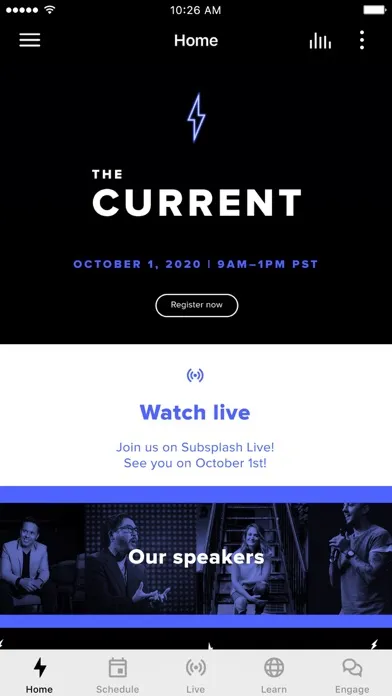
Subsplash has quietly become the favorite of growing and large churches that want one platform - not five - to run their digital ministry. Open the app store and the church apps you see from a megachurch in Dallas, a multisite in Atlanta, and a fast-growing plant in Phoenix are very often built on the same engine. The branding looks bespoke, the sermon library plays cleanly on a Roku, and the give button doesn’t kick you out to a third-party page. That’s usually Subsplash under the hood.
It doesn’t try to be the cheapest. It doesn’t try to be a self-serve weekend project. It doesn’t market itself to small churches the way Tithe.ly does. What Subsplash sells, and the reason its retention among 1,000+ attendee churches is so high, is an end-to-end stack - custom-branded mobile apps, TV apps for the three platforms that matter (Roku, Apple TV, Fire TV), sermon hosting with automatic transcription, online and text-to-give donations, websites, push notifications, kids check-in, and live streaming - all administered from one dashboard, with one support team.
For a 200-person church, that breadth is overkill. For a 2,000-person church with a media director, a generosity pastor, and a kids minister all touching the same congregant data, it is the single most efficient piece of software a ministry can buy. This review walks through what Subsplash actually does well, where it falls short, what it really costs, and how it compares to the two platforms that come up in every shortlist alongside it - Tithe.ly and Pushpay.
✓ The good
- Fully custom-branded apps - your logo, your colors, your app icon in the App Store and Google Play, not a generic shell
- TV apps on Roku, Apple TV, and Fire TV - the differentiator no competitor matches at this depth
- Sermon hosting with automatic transcription - upload once and it goes to the app, website, and TV apps with searchable text
- Integrated giving that stays inside your brand - donors never see a third-party checkout
- Kids check-in, push notifications, and event registration all share one congregant database
- White-glove onboarding - a real Subsplash project manager builds your app with you, not a template wizard
- Genuinely strong design out of the box - the apps look like products an in-house team built
✗ Watch out
- Opaque pricing - you cannot see a number on the marketing site, and quotes vary widely
- Annual contracts - month-to-month is not the norm and exit is not casual
- Overkill for churches under ~200 attendees - the price-to-use ratio breaks down fast at small scale
- Module pricing - giving, websites, and TV apps are often add-ons, not bundled by default
- Steeper learning curve for staff - the admin dashboard is powerful but not minimal
- App updates go through Subsplash’s release cycle - you don’t control your own App Store submissions
Best for
- Multisite and megachurches (1,000+ attendees)
- Growing churches investing seriously in digital ministry
- Ministries that want one vendor for app, web, giving, and TV
- Churches that broadcast to Roku, Apple TV, or Fire TV
Avoid if
- You are a small church (under 200) on a tight budget
- You want to pay under $100/mo for a church app
- Your staff prefers fully self-serve, no-onboarding tools
- You only need giving - not a whole platform
What Subsplash is
Subsplash is a church technology platform that builds and operates a ministry’s entire digital front door. At its core it is a custom-branded mobile app - your name on the icon, your design language inside - that doubles as a sermon library, a giving portal, an event registration system, and a push-notification channel. Around that core, Subsplash layers a website builder, TV apps for Roku and Apple TV and Fire TV, a media platform with automatic transcription, online and text-to-give donations, and check-in for kids ministry.
Founded in 2005 in Seattle and used today by tens of thousands of churches, schools, and faith organizations, the company sells the bundle as much as it sells any single tool. The pitch is that one vendor with one congregant database, one support team, and one design system can do what most churches currently piece together from five or six separate products - and that the resulting experience for a regular attender is dramatically more cohesive.
Why growing churches choose Subsplash
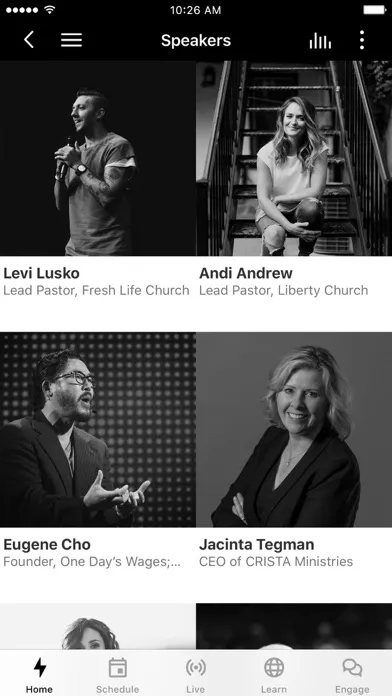
The single biggest practical difference between Subsplash and the cheaper competition is that Subsplash treats your church as the brand. The app is not a Subsplash app with your logo dropped in a header - it is your app, listed under your ministry’s name in the App Store, with your color system, your typography, and your splash screen. To a congregant downloading it on a Sunday morning, there is no Subsplash branding visible anywhere. That is harder than it sounds and almost no competitor at lower price points actually delivers it.
The second reason mid-to-large churches keep landing here is the breadth of the platform under that branded surface. When the same sermon a guest watches in the app on Sunday afternoon is automatically available on Roku that night, transcribed and searchable on the website by Tuesday, and clipped into a 60-second push notification on Friday - and the giving link inside that sermon ties back to the same congregant record as the kids check-in their family used at 10:30 a.m. - that is an experience a five-tool stack simply cannot produce. Subsplash sells integration, and at scale that integration is what the money is paying for.
Custom-branded apps: the differentiator vs. Tithe.ly
When you sign with Subsplash, you are not getting a slot inside a shared church app. You are getting a fully white-labeled native iOS and Android application - submitted under your church’s developer account (or Subsplash’s, with your name front and center), with your icon on the home screen, your splash, your navigation, and your content. A Subsplash designer works through your brand kit, the engineering team handles all App Store and Google Play submissions and updates, and the result lands in stores looking like a product an in-house team shipped.
This sounds like a small thing. In practice it is transformative. Tithe.ly’s Church App tier (the cheaper competitor) effectively gives every church a version of the same app with their logo at the top - fine for a 75-person plant, but it shows the moment a congregant compares it to anything else on their phone. Subsplash’s deliverable looks like Apple shipped it for you, and for a church investing real budget in digital presence, that gap is the whole reason to be on the platform.
Sermon hosting + multi-screen reach: Roku, Apple TV, Fire TV
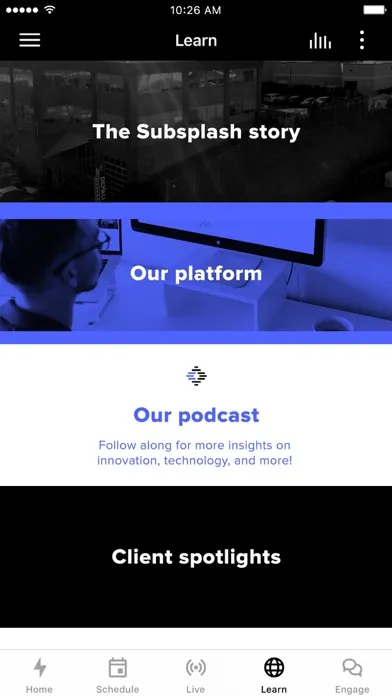
Subsplash’s media engine is built for churches that produce more than a Sunday morning livestream. You upload one sermon - video or audio - and the platform handles encoding, hosting, automatic transcription, chapter markers, and distribution to every surface you operate: the mobile app, the website embed, the podcast feed, and crucially the TV apps on Roku, Apple TV, and Fire TV. The transcription is genuinely usable for search and for accessibility, and the player is fast on cellular.
The TV piece is where Subsplash genuinely has no peer at this category. Building, submitting, and maintaining a Roku channel and an Apple TV app is a small engineering project on its own - and Subsplash includes it as a module rather than a separate vendor relationship. For a church whose older congregants watch sermons on a living-room TV, or whose multisite locations want to push the main campus sermon to overflow rooms via a streaming box, this is the feature that closes the deal. Tithe.ly does not really compete here. Pushpay/Resi has Resi for streaming, but it is more broadcast pipeline than congregant-facing TV experience.
Integrated giving + check-in + websites: one congregant, one record
The third pillar is the suite of operational tools that share the same congregant database as the app: online and text-to-give donations, kids check-in (with secure pickup tags and ratio limits), event registration, group sign-ups, and a drag-and-drop website builder. Push notifications, email, and SMS all draw on the same contact list, and giving history, attendance, and engagement live on a single profile that staff can actually use for pastoral follow-up.
The unlock is not any one of these tools individually - Planning Center does check-in better, Tithe.ly Giving is arguably faster to set up, and Squarespace makes prettier websites. The unlock is that they all share one record. A first-time visitor who checks a kid in, gives $50, and registers for the next Alpha course shows up as one person on one screen, and a pastor can call that family on Monday with the whole picture. That is the operational reason churches consolidate onto Subsplash even when they liked their old individual tools.
Pricing
Starter
Custom (often ~$300-$500/mo)
Entry tier - typically a branded app plus a single module like giving or media. Good for churches dipping a toe in.
Growth
Custom (often ~$600-$1,200/mo)
The plan most mid-sized churches actually land on - branded app, website, giving, media hosting, and push notifications bundled.
Enterprise / Multisite
Custom (often $1,500-$2,000+/mo)
Multisite churches, megachurches, and ministries that need TV apps on Roku/Apple TV/Fire TV plus advanced check-in and analytics.
Subsplash does not publish prices, which is the first thing every prospective customer notices and the first thing that frustrates them. Quotes are built from a base platform fee plus modules - apps, media, giving, websites, TV apps, check-in - and they scale with church size and feature mix.
As a practical range, most churches we hear from land somewhere between $300 and $2,000+ per month, on annual contracts. A church with around 300 attendees taking the app and giving modules is often in the $400-$700/mo neighborhood. A 1,500-person church with apps, TV, website, giving, and check-in is more typically in the $1,200-$1,800/mo range. Multisite ministries with full deployments routinely run higher.
Giving fees on the donation module are competitive - broadly in line with Tithe.ly and Pushpay - and the company offers an ACH-cover-the-fees option for donors. The platform fee is what differs, and what you are paying for is the bundle, the white-glove onboarding, and the TV apps.
Most churches do not need every module on day one. The strongest starting bundle for a growing church is app + media + giving + push, with the website and TV apps added later as the digital strategy matures.
Where Subsplash falls behind
No public pricing. You cannot evaluate Subsplash on a Tuesday afternoon without a sales call, and that alone disqualifies it for plenty of pastors who just want a number. Tithe.ly publishes its prices and wins a lot of deals on transparency alone.
Not built for small churches. A 75-person plant trying to make the numbers work on Subsplash is going to feel the gap between what they’re paying and what they’re actually using. The platform shines starting around 200 attendees and really earns its keep north of 500.
Self-service ceiling. The platform is powerful but the dashboard is not minimal, and most churches lean on Subsplash’s onboarding team to set things up rather than doing it themselves. If your culture is "we figure it out on a Saturday," this is more vendor-heavy than you may want.
App Store submission control. Updates to your branded app go through Subsplash’s release pipeline, which is fine 95% of the time and frustrating the other 5%. Churches with an in-house dev team sometimes find this constraint chafes.
Module sprawl. The "everything is a module" pricing model can creep - what looks like a $500/mo platform becomes a $1,100/mo platform once you add giving, websites, and TV. It is worth pricing the full bundle you actually want up front.
Subsplash vs. Tithe.ly vs. Pushpay
These are the three names that come up in almost every church-platform shortlist, and they sit at meaningfully different price points and audiences. Different strengths. Subsplash is the premium end-to-end platform - branded apps, TV apps, media, websites, giving, and check-in all in one place, priced for mid-to-large churches. Tithe.ly is the value play - strong giving product, an inexpensive Church App tier, transparent pricing, easy self-serve setup, built for small-to-medium churches that mostly need giving and a basic app. Pushpay is the enterprise generosity specialist - historically the giving platform of choice for megachurches, now bundled with Resi (streaming) and Church Community Builder (ChMS) under the same parent company.
For a church under 250 attendees, Tithe.ly usually wins on cost and simplicity. For a church between 250 and 1,000 that wants a polished, branded experience without building it themselves, Subsplash is the most common landing spot. For a megachurch whose giving strategy is the center of gravity - capital campaigns, recurring giving optimization, donor analytics - Pushpay has the deepest generosity tooling and the integrations to back it up, though its app experience is increasingly catching up rather than leading.
The honest summary: Tithe.ly is broader in pricing reach (free tier exists). Subsplash is better at the branded app and the TV apps. Pushpay is better at high-end generosity tooling and the ChMS integration via CCB. Most growing churches end up either Tithe.ly-then-Subsplash as they scale, or Subsplash-or-Pushpay once they’re past 1,000 attendees and the decision becomes "which all-in-one do we trust."
The bottom line
Subsplash is the thoughtful mid-to-large church’s default for a reason - it ships a genuinely beautiful branded app, it is the only platform at this category with serious TV-app reach, and it consolidates five vendors into one congregant record. The price tag is real and the lack of public pricing is annoying, but for a ministry past about 200 attendees that wants its digital experience to feel like the rest of its production quality, Subsplash earns the spend. Small churches should start with Tithe.ly. Everyone else should at least get the quote.
Alternatives to Subsplash
 ShareFaithA content-first church Suite combining media, kids curriculum, website, giving, and a member app, with weaker pricing and iOS clarity.
 Tithe.lyThe value alternative - transparent pricing, free giving tier, and a Church App offering that is hard to beat under 250 attendees.
 Planning CenterThe operational backbone many Subsplash churches still pair with - best-in-class services, people, check-ins, and groups modules.
 SermonaryA sermon-prep tool rather than a platform - what pastors use to write the message Subsplash then distributes.
 MultiTracksWorship-team specialist for stems, click tracks, and in-ear mixes - sits alongside Subsplash, not against it.
Frequently asked questions
How much does Subsplash actually cost?
Subsplash does not publish prices and quotes are built from a base platform fee plus modules. As a working range, most churches land between $300 and $2,000+ per month on annual contracts, with the typical mid-sized church somewhere in the $600-$1,200/mo neighborhood once apps, giving, media, and push are bundled. Larger multisite deployments with TV apps and check-in commonly run higher.
Is Subsplash worth it for a small church?
Usually not. The platform is engineered for the operational complexity of a 500+ attendee church, and at smaller sizes the price-to-use ratio gets hard to justify. A church under 200 attendees is generally better served by Tithe.ly’s Church App and Giving products, and can graduate to Subsplash when the digital ministry actually outgrows them.
Does Subsplash really build TV apps for Roku, Apple TV, and Fire TV?
Yes - and this is one of the genuine differentiators. The TV apps are a Subsplash module, fully branded to your church, with your sermon library and live stream available on the three platforms most living-room TVs run. Building and maintaining those apps independently is a meaningful engineering project, so getting them as part of a bundle is a real reason mid-to-large churches choose the platform.
How does Subsplash compare to Tithe.ly?
Different strengths. Tithe.ly is the value play with transparent pricing, a free giving tier, and a Church App offering that works well under 250 attendees. Subsplash is the premium end-to-end platform - fully white-labeled branded apps, TV apps, media hosting with transcription, websites, giving, and check-in in one suite. Most churches start on Tithe.ly and move to Subsplash as their digital strategy outgrows the cheaper tier.
How does Subsplash compare to Pushpay?
Pushpay is the enterprise generosity specialist, historically dominant in giving for megachurches and now bundled with Resi for streaming and Church Community Builder for ChMS under the same parent. Subsplash is broader on the front-end congregant experience - the branded app and TV apps are stronger. Pushpay is broader on back-end generosity tooling and ChMS depth. Both are reasonable picks past 1,000 attendees; the choice usually comes down to whether giving strategy or the app experience is the bigger priority.
Can our church handle Subsplash without a dedicated staff member?
Technically yes, practically it helps to have someone whose job at least partly includes "digital ministry." The dashboard is powerful but not minimal, and the best deployments have one staff person - a comms director, media pastor, or admin - who owns the platform. Subsplash’s onboarding team does a lot of the initial build, but ongoing content and updates need an owner.
Does Subsplash work for non-Christian or non-church organizations?
Yes - Subsplash is used by schools, nonprofits, and other faith traditions as well, though its design and module set are clearly built for Christian churches first. The branded app, media hosting, and giving tools are general-purpose enough to fit a Catholic parish, a Protestant multisite, an LDS congregation’s independent media ministry, or a faith-based school equally well.
Sources & further reading
More Church Management Software
 B1 ChurchA genuinely free, open-source church platform - app, website, giving and check-in on one database - run by an Oklahoma nonprofit. The catch is not the price - it is that the vendor own docs call the native app deprecated.
 Involv Chat (church.chat)Involv Chat combines ministry-team messaging, rosters, blocked dates and service scheduling in a focused church workspace—useful when leaders protect volunteer consent and resist turning attendance or gifts data into a spiritual score.
 Pastor Notes AppA two-app system that lets leaders publish sermon notes and invite live congregational response while attendees use the free Bible Notes companion—but its pricing math, refund terms and app privacy disclosures need correction before a church commits.
 Take RootA low-cost, offline-friendly relationship tracker built specifically for evangelism and discipleship follow-up—more intentional than a spreadsheet, but its old generic privacy policy does not adequately describe the sensitive ministry data the product exists to hold.
 ChurchSoftwareChurchSoftware—formerly StoreHouse—offers an unusually broad church-management core for $0, including giving, check-in, accounting and a shared mobile app, while charging transparently for vendor-heavy extras.
 Develop.MeDevelop.Me packages course building, cohorts, discussion, assignments, gamification and mobile learning for churches and mission-driven organizations—with unlimited learners on paid plans, but a vague free tier and a 2022 website privacy notice leave procurement questions open.