- Starting price
- Free app, songs from around $24.99 each
- Free tier
- Yes
- Platforms
- iOS · iPadOS · macOS · Web
- Developer
- MultiTracks.com
- Launched
- 2007
- Updated
- May 24, 2026
The verdict
MultiTracks.com has quietly become the default backing-track platform for touring worship artists and large churches, and there is a reason nearly every in-ear pack on a modern worship stage is fed from a Playback session. The library is officially licensed, the Mac and iOS apps are stable under stage conditions, and the integration story with Ableton, ProPresenter, and lighting consoles is the most mature in the category.
Try MultiTracks.com ↗Opens multitracks.com
MultiTracks.com has quietly become the favorite of nearly every worship leader who has ever had to run click and tracks for a Sunday morning band. It is the platform that powers most of the big touring worship rigs you have seen on a livestream, and it is also the platform a 200-seat church plant ends up on once they decide they actually want the bass line from the studio recording behind their band on Sunday. The library is huge, the licensing is clean, and the Playback app - currently the company’s flagship session player - is one of the few pieces of music-production software that is genuinely built for the stage instead of the studio.
It is not a worship songbook. It does not teach you songs. It does not write you charts on its own, although the integration with PraiseCharts and CCLI fills that gap. What it does, and what almost nothing else does at this level, is sell you the actual multitrack stems from the original studio recording of a worship song - vocals, drums, bass, electric, keys, pads, loops - and then give you a session player that runs those stems live, in time, with a click and guide vocal in your in-ear monitors and the band’s playback rig on stage.
The catalog is the differentiator. Hillsong, Bethel Music, Elevation Worship, Passion, Maverick City Music, Brandon Lake, Cody Carnes, Kari Jobe, Phil Wickham, Chris Tomlin, Housefires, UPPERROOM, Vineyard, Gateway, Jesus Culture, CityAlight, Sovereign Grace - the list keeps going. These are officially licensed stems, not transcriptions, not re-recordings, not karaoke versions. When a song lands on the radio, the multitrack usually lands on MultiTracks the same week, and that release cadence is the reason the platform has the gravity it does.
✓ The good
- Officially licensed studio stems - the actual master multitracks from Hillsong, Bethel, Elevation, Passion, Maverick City and most major worship labels, not re-recordings
- Playback is built for the stage - the Mac and iOS apps are designed around live use, not studio mixing, and they hold up under load
- In-ear and front-of-house workflow is first-class - separate click, guide vocal, and cue mixes route to in-ears while the band hears stems out front
- Ableton and ProPresenter integration - Playback can drive lyrics, lighting cues, and Ableton sessions over MIDI, MTC, and OSC
- Song editing is non-destructive and arrangement-friendly - drag intro/verse/chorus/bridge sections around in the app without re-buying the song
- Hardware ecosystem - the MultiTracks Cloud, the Playback footswitch, and the Pad/Drum sample packs all talk to each other cleanly
- Web library plus apps - buy a song once on multitracks.com and it shows up in Playback on every device on your account
✗ Watch out
- Per-song pricing adds up fast - songs typically run around $24.99 each, and a busy church can spend hundreds a month on the catalog
- Playback subscription is on top of the song purchases - the app itself is free, but advanced features sit behind a paid Playback tier
- No native Android or Windows app for Playback (yet) - the live rig is iOS and Mac only, which forces a hardware choice on smaller teams
- Steep learning curve for first-time MD setups - routing click, cues, and stems through an audio interface is not something the app can hide from you
- Catalog skews contemporary worship - older hymns, liturgical settings, and non-English songs are thinner than the modern catalog
- Stem mixes reflect the studio recording - if you want a stripped-down acoustic arrangement of a heavily produced song, you are doing it yourself
Best for
- Worship leaders and music directors running click and tracks on Sunday morning
- Touring worship artists and bands who need a stable live rig
- Large churches with in-ear monitor systems and a dedicated playback operator
- Production teams integrating Playback with ProPresenter, Ableton, or lighting
Avoid if
- You only run a fully acoustic band with no click or tracks
- Your platform is Windows or Android and you cannot move the rig to Mac or iOS
- You want a songbook, chord charts, or a teaching tool rather than a session player
- Your worship style is primarily hymns, liturgy, or non-English worship
What MultiTracks.com is
MultiTracks.com is two things in one. It is a web storefront that sells officially licensed multitrack stems of contemporary worship songs - the actual master recordings, broken into individual tracks for vocals, drums, bass, electric guitar, keys, pads, loops, and click - and it is the Playback app, a session player for iOS, iPadOS, and macOS that runs those stems live on stage with a click and cue mix routed to the band’s in-ear monitors.
In practical terms, a worship leader buys the song on the web, opens Playback on a Mac or iPad at the front of the stage, drags the song into a setlist, and the app handles the rest - click in the drummer’s ears, guide vocal in the worship leader’s ears, the stems they want out front, MIDI to ProPresenter for lyrics, and timecode to the lighting console. That entire chain, from purchase to in-ear, is the product.
Why touring worship bands and large churches default to MultiTracks
The single biggest practical difference between MultiTracks and almost everything else in the category is licensing. The stems on MultiTracks.com are the actual studio masters - Hillsong releases the stems to MultiTracks, Bethel releases the stems to MultiTracks, Elevation releases the stems to MultiTracks. When you buy "Goodness of God" or "Same God" or "Gratitude," you are getting the file the producer mixed, not a session player’s recreation. That is the entire reason the catalog has gravity. A worship leader who wants the exact intro pad from the Bethel version of a song can have it, and that is not a feature any reputable alternative can match across the board.
The second reason is Playback. Most "tracks apps" are glorified audio players with a click bus. Playback is closer to a stage-hardened Ableton - multi-output routing per stem, separate cue mixes for the band, MIDI and OSC out to drive ProPresenter and lighting, footswitch control for pad transitions, and a non-destructive song editor that lets you drop the second chorus or extend the bridge without leaving the app. It is the model that respects how a live worship rig actually works.
Officially licensed stems: Hillsong, Bethel, Elevation, Passion, Maverick City
The catalog is the headline feature. MultiTracks has direct licensing deals with the major worship publishers and artists - Hillsong Worship, Hillsong United, Hillsong Young & Free, Bethel Music, Jesus Culture, Elevation Worship, Passion, Maverick City Music, Brandon Lake, Phil Wickham, Chris Tomlin, Kari Jobe, Cody Carnes, Housefires, UPPERROOM, CityAlight, Sovereign Grace, Vineyard, Gateway, and dozens more. When a worship single drops, the multitrack typically lands on MultiTracks.com within the same release week, sometimes the same day. That release cadence is part of why the platform is treated as the default - a worship leader who decides on Tuesday to add a song that hit radio Monday usually finds the stems already up.
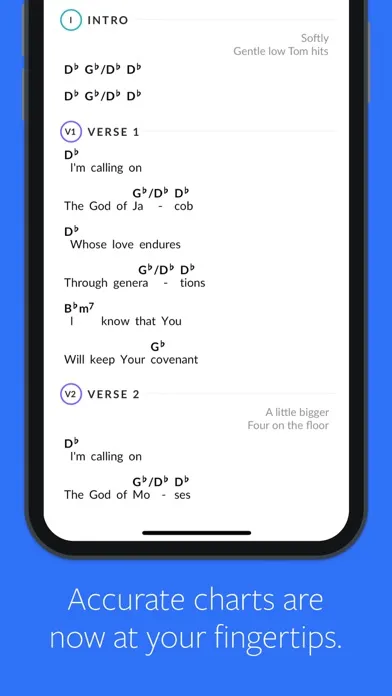
What you get per song is the master session broken into stems - lead vocal, background vocals, drums, percussion, bass, multiple electric guitars, acoustic, keys, pads, synths, loops, and a click track - plus the original chord chart, the song key, the BPM, and (for most titles) a guide vocal cue. You can solo or mute any stem live, set per-stem volumes, send certain stems to the band and others only to in-ears, and re-arrange the song structure non-destructively. The licensing also means CCLI reporting is clean - these are properly accounted commercial recordings, not gray-area transcriptions.
Playback app: Ableton-style session control built for the stage
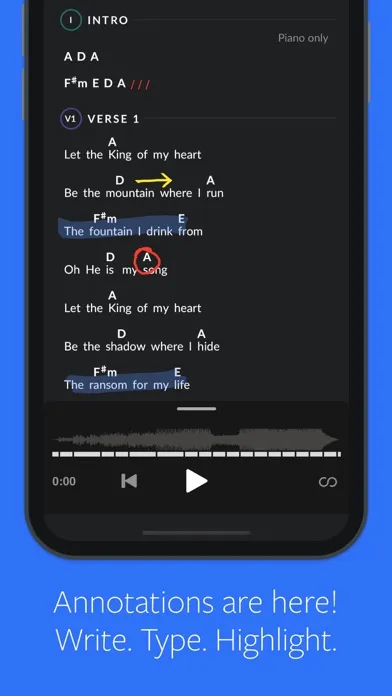
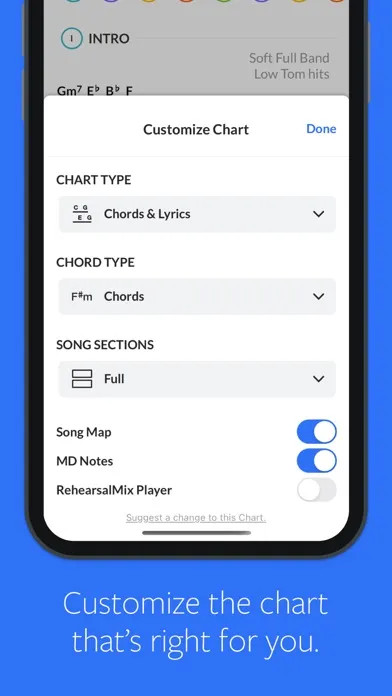
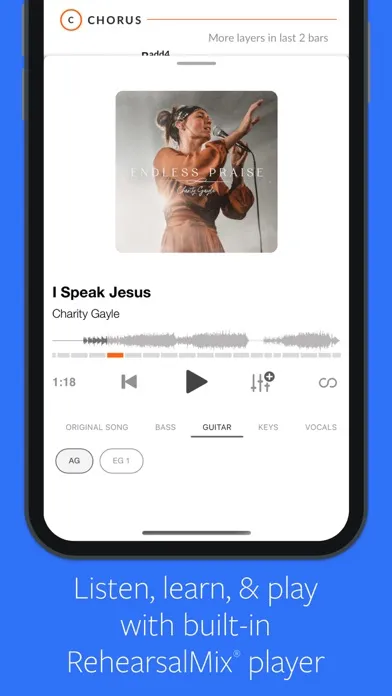
Playback is the session player that runs the show, and it is the piece of software that has earned MultiTracks its reputation among music directors. The app - free to install on iOS, iPadOS, and macOS, with a paid Premium tier for the advanced live features - opens to a setlist view, where each song in your Sunday set is a card you can drag, reorder, transpose, and edit on the fly. Open a song and you get a multitrack mixer: every stem as a fader, a click track, a guide cue, master output, and a song-structure timeline you can edit by dragging sections (Intro / Verse 1 / Chorus / Bridge / Tag) into the order your team is actually playing this week.
Under the hood, Playback is closer to Ableton Live than to a karaoke app. It can route each stem to a separate output on a multi-channel audio interface, run a dedicated cue mix to the drummer’s in-ears that is different from the worship leader’s in-ears, fire MIDI program changes and notes on song start to step ProPresenter slides or trigger lighting scenes, and send MTC or OSC timecode to keep an Ableton session, a lighting console, and a video playback rig locked together. Tap-tempo, transpose, key change, loop a section, fade out on a cue - all of it works under stage conditions, and the app has a reliability reputation that production crews actually trust on Sunday morning.
In-ear monitor and click-track workflow
The other half of what makes MultiTracks the default is the in-ear and cue workflow. A modern worship rig runs a click track to the drummer, a guide vocal to the worship leader so they can hear the next section coming, ambient pads under everything to smooth transitions, and a stripped-down mix of the song stems to the rest of the band so they can play along. Playback is designed around exactly that pattern. You configure your audio interface once - usually a multi-output USB interface like a MOTU or Focusrite - and assign click to one output, guide cues to another, ambient pad to a third, and the band mix to the remaining outputs.
From the worship leader’s side, that means the click and cue are private. The congregation never hears them, the band never hears the guide vocal in the room, and the drummer is the only person hearing the count-in. From the music director’s side, that means every song in the set is pre-routed and ready - you do not rebuild your cue mix per song, the app handles it. The footswitch (a small Bluetooth pedal MultiTracks sells, or any compatible MIDI controller) lets the worship leader trigger pad changes, advance the song timeline, or jump to the next song hands-free. It is the workflow that takes a tracks rig from "fragile setup the MD has to babysit" to "stable Sunday morning tool the worship leader controls themselves."
Pricing
Free Account
$0
Browse the catalog, demo every song, build setlists, and use the free tier of the Playback app. You do not pay until you buy a song or upgrade Playback.
Songs (à la carte)
Around $24.99 per song
The standard model. Buy each song once, own the multitrack stems on your account, and stream or download them inside Playback on every device you own.
Playback Premium
Around $14.99/mo
Unlocks the advanced Playback features most live rigs need - multiple output routing, MIDI and OSC control, ProPresenter and Ableton integration, and cue mixes.
Church / Production Bundles
Custom
Discounted song bundles and label collections (Hillsong, Bethel, Elevation, Passion, Maverick City) for churches buying a worship set or a full catalog at once.
MultiTracks runs on a hybrid model that surprises people the first time they price out a year of use. The app itself is free. The catalog is purchased à la carte - typically around $24.99 per song - and you own those stems on your account forever. The advanced live features of Playback (multi-output routing, MIDI/OSC integration, cue mixes, ProPresenter triggering) sit behind a Playback Premium subscription that runs around $14.99 a month as of writing.
For a touring artist or a large church the math is reasonable. A working setlist of 30-40 songs is a one-time investment in the catalog, plus the monthly Playback subscription, plus the audio interface and footswitch on the hardware side. After that the recurring spend is mostly new releases - and most teams add three or four new songs a quarter, not thirty.
For a small church running tracks on a budget, the per-song cost is the friction point. A new church plant that wants ten core songs is looking at around $250 in catalog spend before they have even priced the hardware. The label and church bundles take some of that edge off - Hillsong bundles, Bethel bundles, and Worship Together bundles routinely discount catalog packs significantly when you buy a set.
There is no rental or all-you-can-stream tier for the catalog (yet). That is a deliberate choice - these are properly licensed studio masters, and the artists and labels are paid per purchase. Most worship leaders end up appreciating that model once they understand it, but it is worth knowing going in that "Spotify for worship stems" is not what MultiTracks is selling.
Where MultiTracks.com falls behind
No native Windows or Android Playback app. The live rig is iOS, iPadOS, and macOS only. For a Mac-and-iPad church this is a non-issue, but for a team running Windows laptops and Android tablets it is a hard wall, and it forces a hardware migration that some smaller teams cannot justify.
Per-song catalog cost is real. Around $24.99 per song adds up quickly when a worship pastor is building a library from scratch, and there is no unlimited-streaming alternative at the MultiTracks tier. Loop Community and a handful of cheaper marketplaces fill the budget end of the market for a reason.
Thinner catalog outside modern contemporary worship. Hymns, traditional Black gospel, Spanish-language worship, liturgical and high-church music, and older choruses are all represented but not deeply. A church whose set is half hymns will run out of MultiTracks catalog faster than a church whose set is half Elevation.
Learning curve for first-time MDs. Playback is honest about what it is - a stage session player with the routing and integration capabilities of a small live-production rig. That means audio-interface routing, MIDI channel assignments, cue mix design, and ProPresenter triggering are real concepts the user has to learn. The app does not hide them, and there is no "easy mode" that ships a one-cable setup out of the box.
No first-party chord charts or lyric slides. MultiTracks integrates beautifully with PraiseCharts and ProPresenter, but it does not generate the chart or the slide itself. Most teams treat that as a feature (use the tool that already wins each category), but it is one more subscription on the production budget.
MultiTracks vs. PraiseCharts Tracks vs. Loop Community
Three platforms own most of the worship tracks conversation, and they sit in genuinely different places. MultiTracks is the industry-standard, label-licensed catalog with the most mature live session player. PraiseCharts Tracks bundles tracks with PraiseCharts’ vast chord-chart and orchestration library - the strength is that the chart, the lead sheet, the orchestration, and the track all live in one purchase. Loop Community is the community-built marketplace where worship leaders upload and sell their own multitracks, often at a lower price point and with a much wider tail of song coverage, including songs MultiTracks does not carry.
Different strengths. MultiTracks is better at the studio-accurate stem (the actual Hillsong recording, the actual Bethel recording) and the live session player (Playback). PraiseCharts is broader on the chart-and-track combo, especially if your team reads orchestrated arrangements or runs a choir. Loop Community is broader on song coverage and cheaper per song, especially for arrangements you would never get a label to license - acoustic re-records, lower-key female-led versions, regional worship songs, indie releases.
Most touring artists and large churches end up on MultiTracks for the catalog and the Playback app, then keep a PraiseCharts subscription for charts and a Loop Community account for the long tail. That is the model the production world has actually settled into - MultiTracks for the studio recordings, the other two for everything MultiTracks does not cover.
The bottom line
MultiTracks.com is the thoughtful person’s worship-tracks platform, and the reason it has become the default for touring artists and large-church worship teams is that no competitor matches it on three things at once - officially licensed studio stems from the major worship labels, a session player (Playback) genuinely built for the stage, and an integration story with ProPresenter, Ableton, lighting, and in-ear systems that is the most mature in the category. The per-song catalog cost is real, the Mac-and-iOS-only requirement is real, and the learning curve for a first-time MD is real - but they are gaps worth knowing about going in rather than dealbreakers. If you run click and tracks on Sunday morning, this is the platform.
Alternatives to MultiTracks.com
 OnSongThe chord-chart and setlist app most worship leaders pair with their tracks rig - strong on charts, transposition, and stage display, not a session player.
 Planning CenterChurch-services scheduling, song library, and team coordination - the planning layer behind almost every worship team that runs MultiTracks on Sunday.
 Hymnary.orgThe deep, free hymn database - texts, tunes, and metadata for thousands of hymns - for the half of a worship set MultiTracks’ catalog is thinner on.
 Praise BreakA $4.99 one-purpose soundboard for gospel praise-band grooves and organ-style preaching chords when a full playback rig would be excessive.
Frequently asked questions
Do I need a subscription to use MultiTracks?
You can create a free account, browse the catalog, and install the Playback app for free. You pay when you buy a song (around $24.99 each as of writing) or when you upgrade Playback Premium (around $14.99/mo) for the advanced live features like multi-output routing, MIDI/OSC integration, and ProPresenter triggering.
Are the stems really the original studio recordings?
Yes. MultiTracks has direct licensing deals with most major worship labels and artists - Hillsong, Bethel, Elevation, Passion, Maverick City, and many more - and the stems sold on the platform are the actual master multitracks from the studio sessions, not re-recordings or transcriptions.
Does Playback work on Windows or Android?
Not as of writing. Playback is built for iOS, iPadOS, and macOS. You can still buy and manage songs through the web library on any platform, but the live session player runs on Apple hardware only.
Can MultiTracks drive ProPresenter and lighting?
Yes. Playback Premium can send MIDI program changes, MIDI notes, and MTC or OSC timecode to ProPresenter for slide automation, to lighting consoles for cue triggering, and to Ableton Live for synchronized session playback. This is one of the main reasons it is the default for large-church and touring production.
How does MultiTracks compare to Loop Community?
Loop Community is a community marketplace where worship leaders upload and sell their own multitracks, often cheaper and with broader song coverage, including indie and acoustic re-records. MultiTracks is the officially licensed, studio-master catalog from the major worship labels with the more mature live session player. Many churches use both.
Can I edit song arrangements without re-buying the song?
Yes. Playback’s song editor is non-destructive - you can drag intro, verse, chorus, bridge, and tag sections into any order, repeat or remove sections, change keys, and adjust tempo, all on a copy of the file you already own. You buy the song once.
Do MultiTracks purchases count for CCLI reporting?
MultiTracks distributes properly licensed commercial recordings, so the songs you use are tracked through standard CCLI reporting like any other commercial worship recording. Your church still needs its own CCLI license to use the songs in worship - MultiTracks does not replace that - but the licensing chain on the recordings themselves is clean.
Sources & further reading
More Worship Apps
 AsaphAn ambitious AI workspace for sermon-aligned setlists, song analysis and local feedback—valuable as a planning assistant, risky if its theology scores become a substitute for pastoral judgment.
 Kaleo AIKaleo AI streams church services into live captions and 150+ translated languages, with theology-aware vocabulary and simple fixed plans—but human review and stronger data-governance answers remain essential.
 Nepali Christian Lyrics & ChordsA rare, actively maintained songbook built around the real needs of Nepali-speaking worship teams—but privacy and song-rights documentation lag far behind the app.
 OnStageA modern all-in-one workspace for worship charts, setlists, rehearsals, schedules, chat, and live performance—but conflicting prices and missing legal pages make due diligence essential.
 Unceasing WorshipIHOPKC’s niche streaming service preserves spontaneous prayer-room worship, intercession, live archives, and 76 legacy albums—valuable for listeners who want that exact charismatic worship tradition, but not a general Christian music replacement.
 WorshipTools ChartsA free, full-featured chord chart manager in a category dominated by paid apps - and the rare worship tool that doesn’t nickel-and-dime you on the basics.