
- Starting price
- Free
- Free tier
- Yes
- Platforms
- iOS · Android · Web
- Developer
- WorshipTools
- Launched
- 2012
- Updated
- May 24, 2026
The verdict
WorshipTools Charts is the best free chord chart app for worship teams, full stop. It does the OnSong job - set lists, transpose, capo, foot-pedal page turns, multi-user sync - without a subscription, because the company makes its money on Presenter and hardware. If you’ve been resisting paying $30/yr per musician just to read a chord chart on a tablet, this is your off-ramp.
Try WorshipTools Charts ↗Opens worshiptools.com
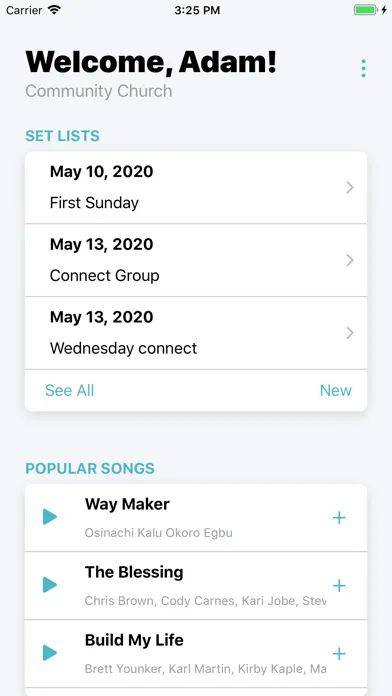
WorshipTools Charts has quietly become the favorite of small and mid-size worship teams who refused to standardize on a paid app. It runs on iOS, Android, and the web. It handles set lists, transposes ChordPro on the fly, supports capo offsets, syncs your team’s plan across devices, and turns pages from a Bluetooth foot pedal - and it does all of that without a subscription, an upsell, or a "Pro" tier hiding behind the good features.
It is not the prettiest app in the category. It doesn’t have the polish of OnSong. It doesn’t have the deep church-ops integration of Planning Center Music Stand. It doesn’t have the multitrack stems of Loop Community or MultiTracks. What it does have is a free price tag attached to a tool that actually works on a Sunday morning - and a real business model behind it, which matters when you’re trusting a vendor with your team’s set lists.
The business model is the quiet point. WorshipTools makes its money on Presenter, their paid worship presentation software, and on the hardware ecosystem around it. Charts is a free on-ramp to that ecosystem. That’s a healthier setup than "free trial, then $X/yr" - the product can stay free indefinitely because it’s subsidizing something else. For teams who don’t need Presenter, that just means a genuinely free chord chart app that isn’t about to flip the switch on you next quarter.
✓ The good
- Genuinely free - no paid tier, no per-musician fee, no premium chord chart features locked behind a paywall
- Cross-platform parity - iOS, Android, and web all run the same Charts app, which matters when your bass player is on a Pixel and your worship leader is on an iPad
- Clean ChordPro transpose - change keys mid-rehearsal and every chart in the set updates instantly, including capo offsets
- Foot-pedal page turns - pair any standard Bluetooth pedal (AirTurn, PageFlip Firefly, Donner) and keep both hands on the instrument
- Multi-user team sync - share a plan once and every musician sees the same set list, the same keys, and the same notes
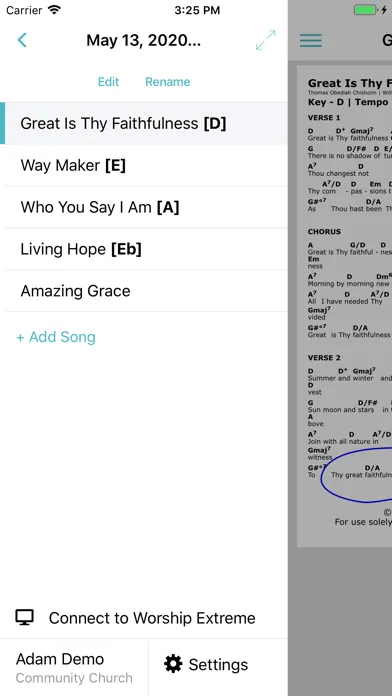
- Set list management that mirrors how worship teams actually rehearse - drag to reorder, mark transitions, attach notes and audio
- Plays well with the WorshipTools Presenter ecosystem if you ever grow into needing slides, lyrics on a projector, or stage display
✗ Watch out
- UI is functional, not beautiful - OnSong still wins on polish and gesture design
- No first-party multitrack stem player (yet) - you can attach reference audio, but if you need click + guides + stems, you’re pairing this with Loop Community or Prime
- Smaller chart library than the giants - there’s no built-in CCLI SongSelect catalog the way Planning Center has, so you’re importing more
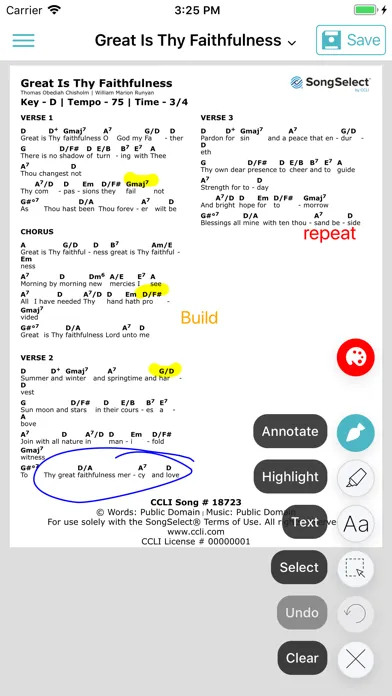
- Annotation tools are basic compared to OnSong - handwritten markup works but doesn’t feel as fluid on iPad with Apple Pencil
- Discoverability of advanced features is uneven - some of the best capabilities live behind menus that aren’t obvious on first launch
- Support is community-forum-first rather than 24/7 chat - fine for the price, less fine when you’re troubleshooting at 8:45 a.m. on a Sunday
Best for
- Small and mid-size worship teams who don’t want a per-musician subscription
- Volunteer-led church bands where half the musicians swap out monthly
- Worship leaders who already use, or are considering, WorshipTools Presenter
- Cross-platform teams running a mix of iPads, Android tablets, and laptops onstage
Avoid if
- Your church is fully standardized on Planning Center and wants one billing relationship
- You need deep multitrack stem playback with click and guide tracks integrated into the chart view
- You depend on Apple Pencil annotation that feels indistinguishable from writing on paper
- You want a single vendor handling charts, scheduling, attendance, giving, and check-in
What WorshipTools Charts is
WorshipTools Charts is a free chord chart manager and live performance tool built specifically for worship musicians. You import or write ChordPro files, organize them into songs and set lists, and pull them up on a tablet, phone, or laptop during rehearsal and Sunday service. The app handles the usual chord-chart chores - transpose to any key, apply a capo offset, switch between chords-and-lyrics and lyrics-only views, share a set list with the rest of the band - and it does it without putting any of those features behind a paywall.
It belongs to a small category of apps where the entire job is "be the music stand," and the competition is dominated by paid players: OnSong (about $30/yr or a one-time purchase depending on plan), Planning Center Music Stand (bundled with a Planning Center subscription), and a long tail of less-polished free options. WorshipTools Charts is the rare free entry that is actually competitive on features rather than just on price.
Why worship teams switch to WorshipTools Charts
The single biggest practical difference between WorshipTools Charts and OnSong is the price tag - and what that price tag means for a volunteer worship team. If you’ve got eight rotating musicians, asking each of them to buy their own OnSong license is friction. Asking the church to buy eight of them is a line-item nobody wants to defend. WorshipTools Charts removes that conversation. Everyone installs it for free, the worship leader shares the plan, and the band is on the same page (literally) within minutes.
The second difference is the model that respects your work. WorshipTools makes money on Presenter and hardware, so Charts has no incentive to grow a premium tier that quietly hollows out the free version. That matters in worship-tech specifically - this is a category where products have been known to start free, build a user base, and then flip to a paid model that strands churches mid-season. Charts has been free for over a decade and the business case for keeping it free is still intact.
The free model: the differentiator in a paid-dominated space
Almost every serious chord chart app in this category is paid. OnSong charges roughly $30/yr or a one-time license depending on plan. Planning Center Music Stand requires an active Planning Center Services subscription, which scales with your church size. MultiTracks Playback and Loop Community Prime are subscription products with their own per-user math. WorshipTools Charts is the one option in that lineup with no paid tier at all - not for the app, not for transpose, not for team sync, not for foot-pedal support, not for capo, not for the things that other apps reserve for "Pro."
This sounds like a small thing. In practice it’s transformative. It changes who can be on a worship team. A 16-year-old learning bass doesn’t need a credit card to read the chart on Sunday. A new volunteer keyboardist doesn’t need to expense the church for an app license before their first rehearsal. The friction of getting a new musician onto your team drops to "download this, I’ll send you the plan link" - and that is the whole pitch.
Team sync and set list management
The set list view is the part of the app you’ll live in. You build a plan, drag songs into the order you want, set the key for each song, and add notes - intro length, repeats, transitions, the part where the worship leader does the awkward "let’s sing that chorus one more time." When you share the plan with your team, every musician’s device pulls the same set list, the same keys, and the same notes. If the worship leader changes a key on Saturday night, every musician’s chart updates before Sunday morning.
The sync model is the everyday-musician killer feature. It is what turns Charts from "a free tool that displays chord charts" into "a free tool that runs a worship team." Mid-rehearsal you can transpose a song down a whole step because the vocalist is fighting a cold, and the change propagates to every device on the platform. That’s the thing volunteer-led teams actually need and the thing paid apps have historically charged for.
The Presenter ecosystem: charts plus stage plus slides
WorshipTools Charts has a sibling - WorshipTools Presenter - that handles the other half of a worship service: lyrics on the screen, slide announcements, video playback, stage display monitors. Presenter is the paid product in the lineup (a free core with paid add-ons), and it’s where the company actually makes its money. If you ever grow into needing a proper presentation setup, the two apps talk to each other: the same songs, the same database, the same set lists. The chord chart your bass player sees on stage and the lyrics the congregation sees on the back wall come from the same source of truth.
You do not have to use Presenter to use Charts. Most teams who land on Charts via word of mouth never touch Presenter - they’ve already got ProPresenter or EasyWorship or Faithlife Proclaim running on the booth computer, and they just need a free chord chart app for the musicians. But for a smaller church starting from scratch, the WorshipTools ecosystem is a coherent end-to-end answer: free for the band, paid (and reasonably priced) for the booth.
Pricing
Charts
Free
The full Charts app on iOS, Android, and web - set lists, transpose, capo, foot-pedal support, team sync. No paid tier exists. This is the whole product.
Presenter (companion)
Free with paid add-ons
WorshipTools Presenter is the worship presentation app - lyrics, slides, video, stage display. The core app is free; certain advanced features and integrations are paid. Optional, not required to use Charts.
Hardware
Varies
WorshipTools also sells stage hardware (foot pedals, remotes, accessories) that pair with Charts and Presenter. Not required - any standard Bluetooth page-turner pedal works with Charts.
WorshipTools Charts is free. Not "free trial." Not "free with ads." Not "free up to three songs." Free, the whole app, every feature, on every platform, with no upgrade button hidden in a settings menu.
The way to think about it: WorshipTools is a worship-tech company that makes money on Presenter and on hardware. Charts is the on-ramp that gets your worship team into the ecosystem, and the company is fine with most users never paying for anything because the ones who do upgrade to Presenter pay enough to keep the lights on. It is the same playbook a lot of B2B software uses - free at the workgroup tier, paid at the production tier.
For a worship leader budgeting for the year, that means $0 against the music line for chord chart software, regardless of how big your rotation gets. If you also need presentation software, Presenter is worth pricing against ProPresenter, EasyWorship, and Faithlife Proclaim on its own merits - but that’s a separate decision from picking up Charts.
Most users do not need anything beyond the free Charts app.
Where WorshipTools Charts falls behind
No first-party multitrack stem player. If your team plays to click and guide tracks with stems - guitars, pads, synth beds - Charts can attach an audio file to a song, but it isn’t built to drive a full backing-track rig. For that you’re pairing Charts with Loop Community Prime, MultiTracks Playback, or Ableton, and accepting two apps in your stage workflow.
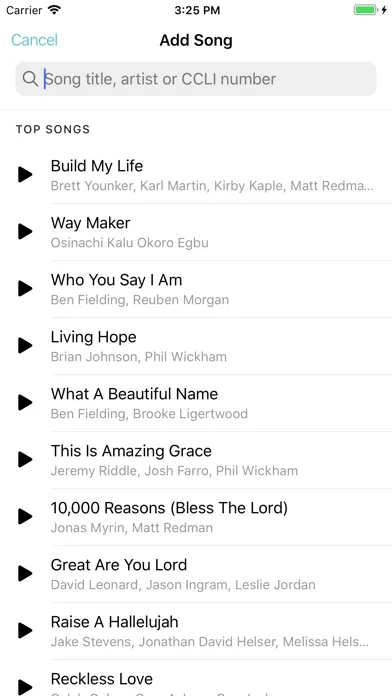
No built-in CCLI SongSelect import. Planning Center Music Stand pulls directly from SongSelect, which means a song is two taps away. With WorshipTools you’re more often importing a ChordPro file or pasting in a chart, which is fine but is more work the first time you add a new song to your library.
Annotation feels a generation behind OnSong on iPad. The basic markup tools are there, but OnSong has invested years in making Apple Pencil annotation feel like writing on paper - pressure, palm rejection, gesture polish. WorshipTools’ markup is functional and gets the job done, but iPad-and-Pencil purists will feel the gap.
Discoverability is uneven. Some of the best features - sync, foot-pedal pairing, capo behavior - live behind menus that aren’t obvious on first launch. There’s a learning curve, and the documentation is okay rather than great. Plan to spend an hour with it before your first rehearsal.
Support is community-forum-first. For a free product that’s reasonable, and the WorshipTools community is genuinely helpful. But if it’s 8:45 a.m. Sunday and sync is broken, you’re not getting a live chat agent - you’re restarting the app, double-checking Wi-Fi, and falling back to a printed chart.
WorshipTools vs. OnSong vs. Planning Center Music Stand
Different strengths. OnSong is the polished iPad-first chord chart app - the best gestures, the best annotation, the most thoughtful one-handed performance UI. It’s also the most expensive, and it’s iOS-only, which is a non-starter if any of your musicians are on Android. Planning Center Music Stand is the church-ops play - if your church is already paying for Planning Center Services for scheduling, songs, and song library, Music Stand is "free" in the sense that it ships with that subscription, and the integration with the rest of the Planning Center suite is unmatched.
WorshipTools Charts wins on two axes neither competitor can match: it is genuinely free for everyone on the team, and it runs on every platform without compromise. The trade is polish. OnSong is better at the iPad-as-music-stand experience. Planning Center is better at the "we’re running a whole church on this platform" experience. WorshipTools is better at "get my volunteer band on the same chord chart by Sunday without a procurement cycle."
A practical rule of thumb: if your team is iPad-only and the church will pay, OnSong is still the gold standard. If your church already runs on Planning Center, Music Stand is the path of least resistance. If you’re a small or volunteer-heavy team, or your musicians use a mix of iOS and Android, or you just don’t want to argue about software licenses anymore, WorshipTools Charts is the obvious pick - and the one most worship leaders end up recommending to other worship leaders.
The bottom line
WorshipTools Charts is the thoughtful person’s answer to "we need a chord chart app and I don’t want to pay per musician." It is free, cross-platform, syncs across the team, handles transpose and capo cleanly, and pairs with any standard Bluetooth foot pedal. It is not as polished as OnSong and not as church-ops integrated as Planning Center Music Stand - real gaps, but they’re worth knowing about going in rather than dealbreakers. For volunteer-led teams and any church that doesn’t want a recurring per-user line item for chord charts, this is the default recommendation.
Alternatives to WorshipTools Charts
 OnStageAn all-in-one worship workspace for song libraries, charts, setlists, scheduling, team availability, chat, rehearsals, and live performance.
 OnSongThe polished iPad-first chord chart app. Best annotation, best gestures, best performance UI - and the highest price tag of the three. iOS-only.
 Planning Center Music StandThe church-ops integrated chord chart app. Bundled with a Planning Center Services subscription, with deep ties to scheduling, song library, and arrangements.
 MultiTracksThe multitrack stems and backing-track platform. Pairs with Charts for teams that need click, guides, and full stems alongside their chord charts.
 Loop CommunityBacking tracks and multitrack stems aimed at smaller worship teams. Affordable Prime subscription; works alongside Charts for the chord-chart half of the rig.
 Nepali Christian Lyrics & ChordsA free Nepali-focused mobile songbook with native-script lyrics, transliteration, chords, transposition, auto-scroll, playlists, and QR sharing.
Frequently asked questions
Is WorshipTools Charts actually free?
Yes - the entire Charts app on iOS, Android, and web is free, with no paid tier and no premium features locked behind a paywall. WorshipTools makes its money on Presenter (their paid worship presentation software) and hardware, which is what subsidizes Charts staying free.
How does it compare to OnSong?
OnSong is more polished, particularly on iPad with Apple Pencil annotation, and has a richer gesture-based performance UI. WorshipTools Charts is free, cross-platform (iOS, Android, web), and has team sync built in without an upgrade. If polish and iPad-first design matter most, OnSong wins. If price and cross-platform matter most, WorshipTools wins.
Do I need WorshipTools Presenter to use Charts?
No. Charts is fully usable on its own. Presenter is the companion app for worship presentation (lyrics on screen, slides, stage display) and is a separate product. Many teams use Charts with ProPresenter, EasyWorship, Faithlife Proclaim, or Planning Center on the booth side without ever touching Presenter.
Does it work with a Bluetooth foot pedal?
Yes. Charts supports standard Bluetooth page-turner pedals - AirTurn, PageFlip Firefly, Donner, and similar - so you can advance pages without taking your hands off the instrument.
Can my whole band see the same set list?
Yes. The worship leader builds a plan and shares it; every musician’s device pulls the same set list, the same keys, and the same notes. Changes made by the leader sync to the team. This is included in the free app, not gated behind a paid tier.
Can I import ChordPro files I already have?
Yes. WorshipTools Charts uses ChordPro as its native format, so any chart library you already maintain in ChordPro can be imported. You can also create and edit charts directly inside the app.
Is there a CCLI SongSelect integration?
Not in the same first-party, two-tap way Planning Center Music Stand has. You can import charts you’ve already downloaded from SongSelect, but the import workflow is more manual than what Planning Center users are used to. For many teams this is the main reason to consider Music Stand over Charts.
Sources & further reading
More Worship Apps
 AsaphAn ambitious AI workspace for sermon-aligned setlists, song analysis and local feedback—valuable as a planning assistant, risky if its theology scores become a substitute for pastoral judgment.
 Kaleo AIKaleo AI streams church services into live captions and 150+ translated languages, with theology-aware vocabulary and simple fixed plans—but human review and stronger data-governance answers remain essential.Nepali Christian Lyrics & ChordsA rare, actively maintained songbook built around the real needs of Nepali-speaking worship teams—but privacy and song-rights documentation lag far behind the app.OnStageA modern all-in-one workspace for worship charts, setlists, rehearsals, schedules, chat, and live performance—but conflicting prices and missing legal pages make due diligence essential.
 Unceasing WorshipIHOPKC’s niche streaming service preserves spontaneous prayer-room worship, intercession, live archives, and 76 legacy albums—valuable for listeners who want that exact charismatic worship tradition, but not a general Christian music replacement.MultiTracks.comThe officially licensed stem library and Playback session player behind most touring worship rigs and large-church Sunday mornings - and the closest thing the industry has to a default.