
- Starting price
- Around $30/mo (smallest church tier)
- Free tier
- No
- Platforms
- macOS · Windows
- Developer
- Faithlife
- Launched
- 2014
- Updated
- May 24, 2026
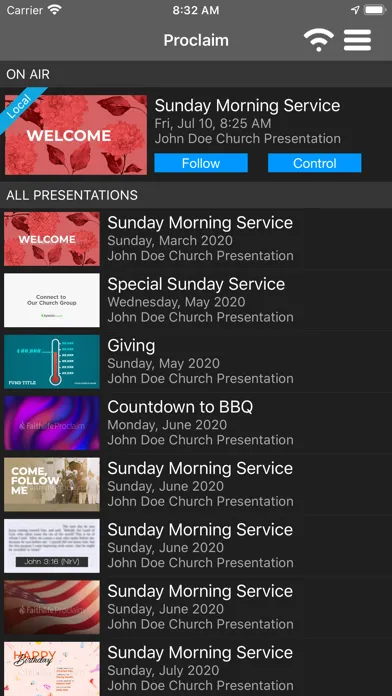
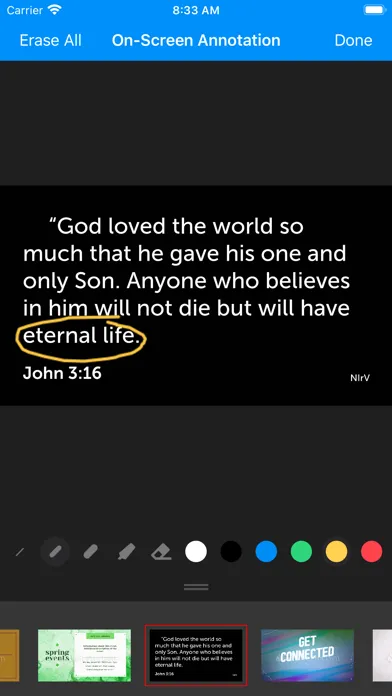
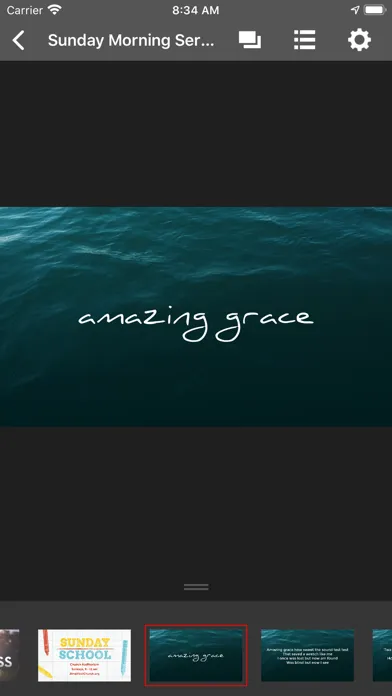
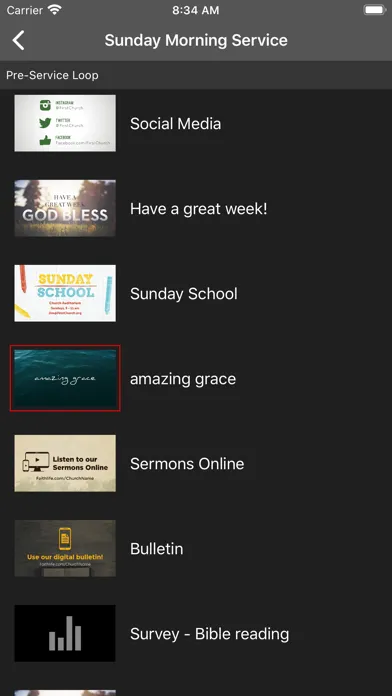
Publisher screenshots from the App Store. These images are separate from our own testing.
The verdict
Faithlife Proclaim has quietly become the favorite of small and mid-sized churches that want ProPresenter-class slides without ProPresenter-class complexity - and it is the only major worship app where three people can edit one service simultaneously from three different computers.
Try Faithlife Proclaim ↗Opens faithlife.com
Faithlife Proclaim is a cloud-based worship presentation app made by Faithlife, the same company behind Logos Bible Software. It runs on Mac and Windows, syncs every service to the cloud automatically, and is built around a collaboration model that no other major worship-software vendor offers: multiple staff members and volunteers can edit the same Sunday service at the same time, from different computers, and see each other’s changes in real time.
It is not a free download. It is not a one-time purchase. It is not a stripped-down lyric tool - it handles sermon slides, song lyrics with chord-aware transposition, announcement loops, lower-thirds, video playback, NDI output to stream encoders, and live confidence monitors for the platform. The subscription model is tiered by church size, which means a 75-person plant pays a very different price than a 1,500-seat multi-site campus.
The reason Proclaim shows up on shortlists at all is the Faithlife ecosystem. If your church already lives inside Logos, Faithlife Sermons, or Faithlife Equip - pulling Bible passages, sermon notes, or pastor’s study material straight into the Sunday slide deck happens with a couple of clicks instead of a copy-paste relay through three apps. That tight connective tissue, paired with the live-collaboration model, is the entire reason this app exists as a standalone product rather than as a feature inside Logos.
✓ The good
- Real-time collaborative editing - multiple users edit the same service simultaneously, the only major worship app that does this
- Cloud-native by default - every service auto-syncs, so a dead laptop on Sunday morning is a 5-minute recovery instead of a crisis
- Tight Logos and Faithlife integration - pull a Bible passage, sermon outline, or commentary block straight into a slide
- Built-in song library with chord transposition and CCLI reporting - most churches can retire a separate lyric tool
- NDI and ProPresenter-compatible network outputs - works with streaming encoders, confidence monitors, and stage displays without extra hardware
- Subscription includes free upgrades forever - no buying a new major version every few years
- Modular subscription scales by congregation size - a 50-seat plant is not paying enterprise prices
✗ Watch out
- No free tier at all - even the smallest church plant pays monthly from day one
- Cloud-first design means a slow or flaky internet connection on Sunday morning genuinely hurts
- Smaller third-party theme and template marketplace than ProPresenter
- Advanced video and motion compositing is not on par with ProPresenter 7 (yet)
- Tighter to the Faithlife ecosystem than some teams want - the more you live in Logos, the better the fit
- No iPad or Linux client for the operator station - Mac or Windows only
Best for
- Small to mid-sized churches already using Logos or Faithlife Sermons
- Multi-staff worship teams who edit Sunday services collaboratively during the week
- Church plants that want professional slides without a $1,000-up-front purchase
- Tech teams that want auto-cloud-backup of every service file
Avoid if
- You need the deepest possible video, alpha, and motion-graphics pipeline (ProPresenter is still the ceiling)
- You prefer to own software outright instead of subscribing forever
- Your campus has unreliable internet and you cannot tolerate cloud sync hiccups
- You run an iPad-centric or Linux-centric A/V booth
What Faithlife Proclaim is
Faithlife Proclaim is presentation software for churches. It drives the screens in your sanctuary - sermon slides, song lyrics, announcement loops, scripture passages, video clips, lower-thirds for live-stream - and the confidence monitors on stage that show the pastor and worship leader what is up next. It runs as a native macOS or Windows app on the operator’s laptop, with separate display outputs feeding the room and the broadcast encoder.
What makes it different from a fancy PowerPoint is the structure around a service. Every Sunday is a "service" object in the cloud - an ordered list of items (welcome loop, opening song, scripture reading, sermon, response song, announcements, closing) that the entire team edits during the week and then runs live on Sunday. The same service file is the live operator’s show file, the worship leader’s confidence monitor, the stream tech’s broadcast feed, and the post-service archive - one source of truth instead of four.
Why mid-sized churches prefer Faithlife Proclaim
The single biggest practical difference between Proclaim and almost every other worship app is that the service file lives in the cloud, not on one volunteer’s laptop. Three people can be editing the same Sunday morning service at the same time - the worship pastor adding songs from home, the tech director swapping the announcement loop from the office, the volunteer A/V lead tweaking the sermon scripture reference from a coffee shop - and every change appears on every screen within seconds. This sounds like a small thing. In practice it is transformative.
The downstream effect is that Sunday morning gets boring in the best possible way. The operator pulls up the service, plugs in the projector, and runs the show - no "did you send me the latest version?" Slack thread, no USB stick swap at 7:50am, no rebuilding a missing song because someone forgot to email the file. The cloud model also means a laptop dying mid-service is a recoverable problem instead of a catastrophe: log into any other Mac or PC, sign in, the service is right there.
Cloud-based, real-time collaborative editing - the differentiator
This is the feature Proclaim leads with, and it is genuinely unique among the big three worship apps. Every service is stored in the Faithlife cloud the moment you create it. Anyone on your team with editor access can open that service from their own computer and start working on it - adding songs, tweaking lyric arrangements, swapping a Bible passage, dragging in a video - and everyone else editing it sees those changes in real time, the way Google Docs works for documents. There is no "check out, check in," no merge conflicts, no "I made my changes on the wrong copy" disasters.
For a single-laptop, single-operator setup, this matters less. For any church where the worship pastor, the tech director, and a volunteer or two all touch the Sunday service during the week, it eliminates an entire category of weekly stress. ProPresenter and EasyWorship are both file-based - the service lives on one computer, and sharing means exporting, emailing, importing, and crossing your fingers that the fonts and media all came through. Proclaim sidesteps all of that. The trade-off (and there is one) is that you are betting on your internet connection. A flaky church-office Wi-Fi network will make the editing experience frustrating.
Logos and Faithlife ecosystem integration
Proclaim is made by the same company that makes Logos Bible Software, Faithlife Sermons, and Faithlife Equip - and the connective tissue between those tools is the second big reason churches pick it. Need John 3:16 in three translations on the screen for Sunday? Type the reference into Proclaim and the verse appears as a styled slide, in any translation your Logos library owns, with no copy-paste from a browser. Building a sermon series? The pastor’s outline from Faithlife Sermons can feed slide content directly into Proclaim instead of being retyped. Commentary blocks, study notes, and original-language word studies from Logos can drop in the same way.
If your church is already inside the Faithlife ecosystem, this saves real minutes every week and eliminates a class of typos and reference errors. If your church is not - if your pastor preaches from Accordance or a paper Bible and your slides come from a Google Doc - the integration is less compelling. Proclaim still works fine as a standalone presentation app in that case, but you are leaving its biggest secondary advantage on the table. The more of the Faithlife stack you adopt, the better the fit gets.
Modular subscription tier model
Proclaim is sold as a subscription, tiered by the size of the congregation rather than by feature set. Every tier gets the same software - full collaborative editing, full ecosystem integration, full output options. What scales with the tier is editor seat count, cloud storage, the size of the included media library, and the support level. A church plant of 60 people pays roughly $30/mo. A growing congregation of 400 lands somewhere in the $55-$75/mo band. A multi-site or large single-site church runs $110/mo and up.
This is a notable contrast with ProPresenter, which is sold as a one-time license per machine (currently around $399 per computer for the standard version, more for advanced editions and add-ons). The math depends on how many machines you run and how long you keep the software. A two-computer church paying $30/mo for Proclaim spends about $720 over two years; a two-computer ProPresenter church spends ~$800 once and is done - but is then locked to that version unless they pay again to upgrade. Proclaim includes every future upgrade automatically. Different models, different trade-offs.
Pricing
Small Church
~$30/mo
Smallest tier, sized for congregations under roughly 100 weekly attenders - full feature set, capped seat count.
Mid-Size Church
~$55-$75/mo
The sweet spot for most growing congregations - adds more editor seats, more cloud storage, full multi-campus support.
Large Church
~$110/mo and up
For multi-site and large single-site congregations - unlimited editors, advanced broadcast outputs, priority support.
Faithlife Equip bundle
Custom - usually bundled per-member
Proclaim bundled with Faithlife Equip, Faithlife Sermons, and Logos library access for the entire congregation. Best for churches going all-in on the Faithlife stack.
There is no free tier. Even the smallest church pays from day one - this is a clear difference from OpenLP or a freeware lyric tool. The smallest paid tier sits around $30 a month and covers a congregation of roughly under 100 weekly attenders, with a capped number of editor seats but the full feature set.
Mid-size church pricing, the most common landing spot, runs in the $55-$75/mo range and is where most growing congregations end up. This tier opens up more editor seats, more cloud storage, and works comfortably for multi-service single-campus operations. It is the balanced default for most readers of this review.
Large church pricing starts around $110/mo and scales up from there based on attendance and the number of campuses. Unlimited editors, priority support, broadcast-grade output flexibility. Multi-site churches running a service file across several campuses at once mostly live here.
Finally, Faithlife sells Proclaim bundled inside Faithlife Equip - a church-platform subscription that also includes Faithlife Sermons, group Bible studies, giving tools, and discounted Logos library access for every member of the congregation. If your church is going all-in on the Faithlife stack, the bundle math gets attractive fast. If you are not, do not let the bundle pressure you into adopting tools you would not otherwise use.
Limitations and considerations
No free tier. ProPresenter and EasyWorship both sell perpetual licenses you can use forever without further payment, and OpenLP is free. Proclaim is subscription-only - if your church genuinely cannot or will not pay monthly, this app is off the table no matter how good it is.
No motion-graphics ceiling. ProPresenter 7 is still the high end for layered video, alpha channels, programmable propresenter modules, and complex stage-display layouts. If you are producing a worship night with motion backgrounds, IMAG, custom transitions, and a video team running ten layers of compositing, Proclaim will frustrate you. For a typical Sunday morning, it is more than enough.
No iPad or Linux client. The operator station has to be Mac or Windows. Some churches that have standardized on iPad-based stage manager workflows will find this awkward, and Linux-based A/V purists are out of luck.
Cloud dependency is real. The local app caches enough to run a service even if internet drops at the worst moment, but the editing and collaboration experience during the week assumes a working connection. A church in a building with unreliable Wi-Fi or in a rural area with thin broadband will feel friction Proclaim users in well-connected buildings never notice.
Smaller theme marketplace than ProPresenter. The third-party ecosystem of paid themes, motion loops, and templates is broader on ProPresenter. Proclaim has a solid built-in library and a respectable add-on store, but the long tail of designer-made themes is thinner.
Faithlife Proclaim vs. ProPresenter vs. EasyWorship
Different strengths. ProPresenter is better at high-end production - multi-layer video, advanced stage displays, programmable modules, broadcast pipelines that look like a small TV station. EasyWorship is the established workhorse for traditional churches that want a one-time-purchase, Windows-native app with a familiar interface and a strong song database. Proclaim is broader on team workflow (collaborative cloud editing), ecosystem integration (Logos, Faithlife Sermons), and predictable subscription pricing.
On price model: ProPresenter is roughly $399 per computer (one-time) for the standard edition, more for advanced editions and broadcast tooling. EasyWorship is a perpetual license around $400 with a less aggressive upgrade cadence. Proclaim is subscription-only, tiered by congregation size, with every upgrade included. Over five years a two-machine ProPresenter church might spend less than a Proclaim church of the same size - but the Proclaim church gets every new feature for free and never has to budget a re-purchase.
On who should pick which: production-heavy churches with serious video teams and one or two operator stations should keep looking at ProPresenter. Established traditional churches that want a familiar, owned-outright Windows app should look at EasyWorship. Mid-sized churches with multi-staff worship and tech teams who already touch Logos or Faithlife Sermons should put Proclaim at the top of their short list - it is the worship app that respects collaborative workflow as a first-class feature instead of an afterthought.
The bottom line
Faithlife Proclaim is the worship-presentation app you pick when your team is more than one person and your church is already living somewhere in the Faithlife ecosystem. The collaborative cloud-editing model is genuinely category-defining - no other major worship app does it - and the Logos integration removes a class of weekly busywork for any team that builds scripture-heavy services. It is not the right choice for everyone. Production-heavy churches will hit its ceiling, and subscription-averse buyers should stick with ProPresenter or EasyWorship. For everyone in the middle, Proclaim is the most pragmatic choice on the market.
Alternatives to Faithlife Proclaim
 ProPresenterThe high-ceiling worship app. Best motion-graphics and broadcast pipeline of the major options; one-time license per machine; weaker collaborative workflow.
 EasyWorshipThe established traditional-church choice. Windows-native, familiar interface, strong song database, perpetual license - but no real-time multi-user editing.
 Faithlife EquipThe broader Faithlife church-platform subscription that bundles Proclaim with Sermons, group tools, and member Logos access.
 Logos Bible SoftwareThe Bible-study engine that powers Proclaim’s scripture and commentary integration. If you want the slide app to feel deep, the library behind it matters.
Frequently asked questions
Does Faithlife Proclaim have a free version?
No. Proclaim is subscription-only. Every congregation pays monthly from day one. The smallest tier starts around $30/mo and scales up by church size. If you need a free option, look at OpenLP - but you will give up the collaborative editing, Logos integration, and cloud sync that make Proclaim distinctive.
Can my whole worship team really edit the same Sunday service at the same time?
Yes - that is the headline feature. Multiple editors can be inside the same service simultaneously from different computers, and changes appear on every screen within seconds. It works the same way Google Docs works for documents, and no other major worship app (ProPresenter, EasyWorship) offers this today.
Do I need Logos Bible Software to use Faithlife Proclaim?
No, Proclaim works fine as a standalone presentation app. But if your church already uses Logos or Faithlife Sermons, the integration is the second-biggest reason to pick Proclaim - you can pull Bible passages, sermon outlines, and study notes straight into your slides instead of copy-pasting from a browser.
Faithlife Proclaim vs. ProPresenter - which should we pick?
Different strengths. ProPresenter is the ceiling for motion graphics, advanced stage displays, and broadcast production. Proclaim is the ceiling for multi-staff collaborative editing and Faithlife-ecosystem integration. Production-heavy churches with serious video teams should stay with ProPresenter; multi-staff worship teams who want shared cloud editing should pick Proclaim.
What happens to our services if the internet goes down on Sunday morning?
The local app caches the upcoming service so you can run it even if the connection drops at the worst moment. What you lose during an outage is editing and cloud sync - running the existing service file is fine. That said, churches in buildings with chronically bad internet will feel friction Proclaim users in well-connected buildings never notice.
Does Faithlife Proclaim handle CCLI song reporting?
Yes. The built-in song library includes CCLI usage tracking, so every time you display a song in a service, it is logged for your CCLI reporting. Most churches using Proclaim can retire whatever standalone lyric tool they were using before.
Can we run Proclaim on an iPad or Linux machine?
No. The operator station has to be macOS or Windows. There is no iPad or Linux client today. If your A/V workflow is iPad-centric, this is a real constraint to weigh before adopting.
Sources & further reading
More Worship Apps
 AsaphAn ambitious AI workspace for sermon-aligned setlists, song analysis and local feedback—valuable as a planning assistant, risky if its theology scores become a substitute for pastoral judgment.
 Kaleo AIKaleo AI streams church services into live captions and 150+ translated languages, with theology-aware vocabulary and simple fixed plans—but human review and stronger data-governance answers remain essential.
 Nepali Christian Lyrics & ChordsA rare, actively maintained songbook built around the real needs of Nepali-speaking worship teams—but privacy and song-rights documentation lag far behind the app.
 OnStageA modern all-in-one workspace for worship charts, setlists, rehearsals, schedules, chat, and live performance—but conflicting prices and missing legal pages make due diligence essential.
 Unceasing WorshipIHOPKC’s niche streaming service preserves spontaneous prayer-room worship, intercession, live archives, and 76 legacy albums—valuable for listeners who want that exact charismatic worship tradition, but not a general Christian music replacement.
 MultiTracks.comThe officially licensed stem library and Playback session player behind most touring worship rigs and large-church Sunday mornings - and the closest thing the industry has to a default.