
- Starting price
- From ~$15/mo or ~$500 one-time
- Free tier
- No
- Platforms
- Windows only
- Developer
- Softouch Development, Inc.
- Launched
- 2003
- Updated
- May 24, 2026
The verdict
EasyWorship is the Windows-running church’s default worship presentation app, and for good reason - it’s simpler than ProPresenter, dramatically cheaper, and a volunteer with no AV background can learn it in a single rehearsal.
Try EasyWorship ↗Opens easyworship.com
EasyWorship has quietly become the favorite of small and mid-sized Protestant churches running Windows in the booth. Walk into a 150-seat church on a Sunday morning, look at the laptop driving the lyric screen, and the odds are very good you’re looking at EasyWorship 7 - currently the active version line - humming along on a refurbished Dell or a HP ProBook the worship pastor bought on sale.
It doesn’t try to be the cinematic, broadcast-grade tool ProPresenter is. It doesn’t pretend to handle stage display, NDI routing, and producer-mode workflows out of the box. It doesn’t require a Mac, a dedicated tech director, or a four-figure license to run on Sunday. What it does is the boring core job of church presentation - lyrics, scripture, sermon slides, announcement loops, the occasional video - with a UI that a 16-year-old volunteer can run on her second week.
The result is a piece of software that’s deeply uncool in the AV-pro corners of the internet and deeply beloved in the actual churches that use it. EasyWorship is the thoughtful person’s ProPresenter alternative if the thoughtful person in question is a worship pastor with a $400 software budget, a Windows-only setup, and a rotating cast of volunteer slide operators. It is, in the most literal sense, easy worship.
✓ The good
- Windows-native and Windows-first - the only major worship app that treats Windows as the primary platform instead of an afterthought
- Genuinely easy to learn - a new volunteer can be running slides confidently after one Sunday of shadowing
- Affordable subscription tier - around $15/month puts professional presentation within reach of churches under 200 people
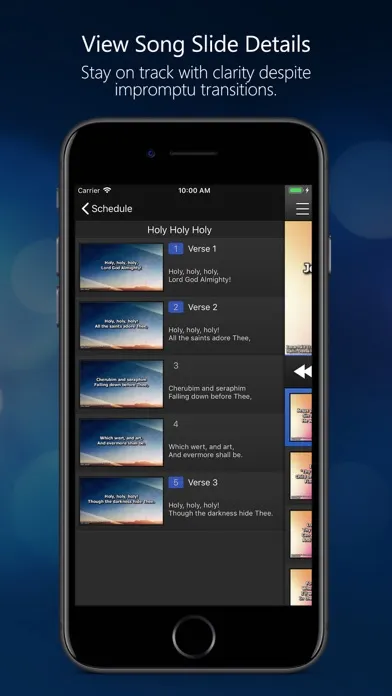
- Built-in CCLI SongSelect integration - search a song, click import, lyrics drop into your service with proper formatting and copyright tags
- Multi-screen output handled cleanly - main projector, stage display, and confidence monitor all configurable without third-party plugins
- Strong scripture module - dozens of Bible translations bundled, drop verses into a service like songs
- One-time license still exists - if you hate subscriptions, you can buy it outright for around $500 and own it
✗ Watch out
- Windows only - if your church bought an iMac for the booth, you’re looking at the wrong product
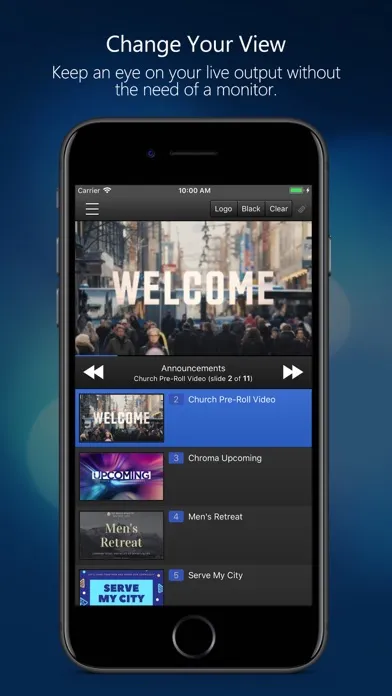
- No real iPad or mobile remote (yet) - ProPresenter has spoiled people on phone-as-remote and EasyWorship hasn’t fully caught up
- Stage display is functional but basic - if your worship leader wants countdowns, next-song previews, and rich layout control, it’s a step behind ProPresenter
- Video editing and motion backgrounds are limited - it plays media well, but it isn’t a video tool
- The look can feel dated next to newer apps - it’s the workhorse, not the showpiece
- Live streaming integration lags - you can route output to OBS, but native streaming features are minimal
Best for
- Small to mid-sized Protestant churches (50-500 attendance) running Windows
- Volunteer-driven AV teams with high turnover
- Churches that prioritize cost and simplicity over cinematic polish
- Plant churches, portable churches, and rural congregations on tight budgets
Avoid if
- Your church is fully on Mac hardware - ProPresenter is the right call there
- You’re a large multi-site or broadcast-production church needing advanced stage display and NDI workflows
- You want the most modern, polished UI in the category
- You need deep iPad-based remote control and confidence monitor features
What EasyWorship is
EasyWorship is dedicated worship presentation software built and maintained by Softouch Development, a Tulsa, Oklahoma company that’s been shipping it since 2003. It runs on Windows, drives one or more output screens, and handles the standard Sunday-morning content stack: worship song lyrics, scripture passages, sermon slides, video clips, announcement loops, and pre-service countdowns. The current major version (7) replaced the long-running version 6 a few years back and is what the company actively develops.
The product’s job is narrow and well-defined. A volunteer in the booth opens a service file, clicks through slides in order during the gathering, and the configured output displays show the right content on the right screen at the right time. EasyWorship is not a video editor, not a streaming platform, not a church management system - it’s the piece of software between your service plan and your sanctuary screens, and it tries very hard to do only that job and do it well.
Why Windows-running churches pick EasyWorship
The single biggest practical difference between EasyWorship and ProPresenter is the operating system question. ProPresenter was built Mac-first and still feels most at home on macOS - its Windows version exists, but the Mac build gets the love. EasyWorship is the mirror image. It’s built for Windows, optimized for Windows, tested first on Windows, and the vast majority of its install base is on Dell, HP, Lenovo, and white-box PCs sitting in church AV booths across the country. If your church already owns Windows hardware, EasyWorship will just work - no driver hunts, no weird multi-display quirks, no "this build is newer on the other platform" tax.
The second reason is cost and complexity. ProPresenter has crept upmarket over the last decade, adding features like advanced stage display, multi-track audio control, and broadcast-grade overlays that are genuinely useful at a 2,000-seat campus and entirely beside the point at a 120-seat church. EasyWorship hasn’t followed it up the mountain. It stayed where the median Protestant church actually lives: lyrics, scripture, a few videos, three output screens at most, and a volunteer running the laptop. That restraint is the product’s identity, not a limitation.
Windows-first design: the actual reason most churches pick it
EasyWorship is Windows-only and that is not a missing feature - it is the feature. The entire codebase, install routine, multi-monitor handling, video codec stack, and driver-compatibility profile is tuned for the kind of mid-range Windows desktop or laptop a church is actually likely to put in the booth. NVIDIA and Intel GPUs are first-class. Common Windows-side capture cards work without exotic setup. The installer is a normal Windows MSI that an IT-savvy volunteer can run. Multi-monitor configuration uses the standard Windows display model that your volunteer already understands from setting up dual monitors at work.
This sounds like a small thing. In practice it’s transformative. A huge swath of churches - especially smaller ones - inherited a Windows PC, or bought one because it was a quarter of the cost of an iMac, or had a tech volunteer who only knew Windows. Telling those churches to switch platforms to use a "better" worship app is a complete non-starter. EasyWorship is built around the realistic constraint that the laptop is already chosen, it’s a Windows machine, and the software has to fit the hardware - not the other way around.
A genuinely simpler UI: the volunteer learning curve
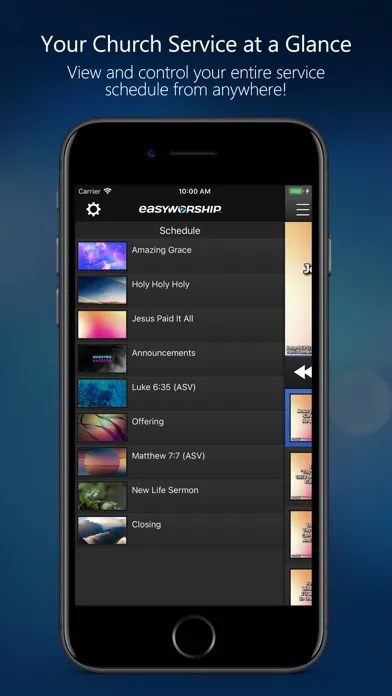
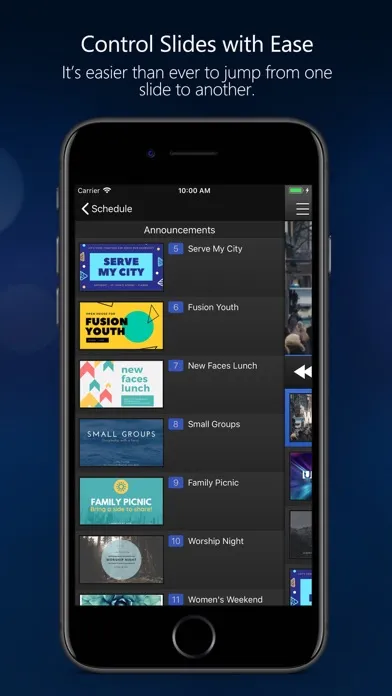
Open EasyWorship and the interface is laid out the way the actual job works. A schedule pane on one side holds the items in your service in the order they’ll happen - countdown, welcome slide, first song, scripture reading, sermon notes, closing song, announcements loop. Click an item and the slides for it appear in the middle. Click a slide and it goes live on the output screen. Drag items to reorder. That’s the core loop, and a competent volunteer learns it in about twenty minutes.
Compared to ProPresenter, which is a deep and powerful application with a learning curve to match, EasyWorship is deliberately shallow. It doesn’t expose a layered timeline, a cue-based broadcast workflow, or props/macros/triggers as first-class concepts. It hides the complexity that most churches will never use anyway, and surfaces the four or five operations that volunteers actually do every Sunday. For a worship pastor managing a rotating volunteer rota - the realistic situation in the vast majority of churches under 500 - that lower learning curve is the difference between a confident slide operator on week two and a panicked one on week six.
Affordable subscription: bringing real presentation software into reach
At around $15/month, EasyWorship’s subscription tier is priced at a level that small churches can actually approve in a budget meeting. ProPresenter’s pricing has historically run substantially higher, and Faithlife Proclaim sits in a similar tier-up bracket. For a 120-person church running on a $400 monthly tech budget that already has to cover streaming bandwidth, microphone batteries, and the worship leader’s click track app, the gap between $15/month and ~$50/month is a real one. It’s the difference between affording professional software and running PowerPoint with a hymnal next to the laptop.
The perpetual license is the other half of this story. For churches that simply hate subscriptions - and there are a lot of them - EasyWorship still sells version 7 outright for around $500 one-time. You install it, you own it, and you keep using it as long as your computer can run it. You’ll miss future major-version features unless you upgrade, but the product won’t hold your services hostage the way a canceled subscription would. Most churches do not need the constant feature firehose. Owning a stable version of competent software for a one-time payment is, for many small congregations, exactly the right deal.
Pricing
EasyWorship Subscription
~$15/mo or ~$180/yr
The full app, ongoing updates, and standard support. The on-ramp most small churches now pick. Cancel and you stop receiving updates, but services already built will still open on the last installed version.
EasyWorship Perpetual License
~$500 one-time
Buy version 7 outright and own it forever. Major version upgrades cost extra. A solid call for churches that hate recurring software bills and don’t need every quarterly update.
EasyWorship Cloud
Included with subscription
Cloud storage and sync for media libraries and service files - useful when more than one volunteer builds services from different computers during the week.
Media Bundles
From ~$10 - ~$200
Optional motion backgrounds, worship loops, countdowns, and themed packs sold separately. Not required - you can run the app indefinitely with free media - but a handy upgrade if your visual library is thin.
EasyWorship’s pricing has two clear lanes: subscribe for about $15/month (or roughly $180/year) and get the latest version plus ongoing updates, or pay around $500 once and own version 7 outright. There’s no free tier - this is church-budget software, not a consumer freemium app - but the entry price is intentionally low enough that a small congregation can justify it without a board meeting.
Most churches under about 300 attendance default to the subscription. It keeps the cash outlay small, bundles cloud sync and support, and means you’re always on the supported version when something breaks ten minutes before service. The perpetual license is the better deal for churches with a stable computer setup, no appetite for monthly software bills, and a willingness to skip the occasional major-version upgrade.
Optional media bundles - motion backgrounds, worship loops, themed countdowns - are sold separately for anywhere from $10 for a small pack to a couple hundred dollars for the comprehensive sets. Most churches do not need these. There’s a healthy ecosystem of free worship media (and your worship pastor probably already has a folder full of motion backgrounds), and EasyWorship will play whatever standard formats you point it at.
Compared to the rest of the category, the math is straightforward: EasyWorship is the cheapest serious option for a Windows church. It’s not free, but it costs roughly a third of what ProPresenter or Faithlife Proclaim do at the small-church tier - and it does the core job both of those apps were originally built to do.
Where EasyWorship falls behind
No Mac version. Full stop. If your church standardized on Apple hardware - and a lot have, especially newer plant churches led by media-savvy younger pastors - EasyWorship is simply not an option. There’s no roadmap, no rumored port, no virtualized workaround the company supports. This is by design (Windows-first is the strategy) but it’s a hard wall.
No first-class iPad remote (yet). ProPresenter’s iPad app, which lets a worship leader see what’s on the screen, see what’s coming next, and trigger the next slide from the platform, is a feature a lot of pastors have grown attached to. EasyWorship has remote-control capabilities, but the polish and the workflow aren’t at the same level. For a small church where the slide operator is in the room and visible to the worship leader, this doesn’t matter. For a larger one where the platform and the booth are far apart, it does.
Broadcast-grade stage display and producer-mode workflows are not the focus. EasyWorship can drive a stage monitor with lyrics and the next-slide preview, and that covers the realistic needs of most churches. But if you’re running a multi-cam streaming production with NDI routing, lower-third overlays generated from cues, and a dedicated producer position calling the show, you’ve outgrown the product. That’s ProPresenter (or a broadcast tool entirely).
Motion graphics and live video manipulation are basic. Slides composite cleanly with backgrounds, videos play in line with the service, and the result looks fine on a 1080p sanctuary screen. But the app isn’t a video editor or a motion-graphics engine. If your creative team wants real-time effects, advanced transparency stacking, or per-pixel control of how text sits over animated backgrounds, you’ll feel the ceiling.
Live streaming features are minimal. You can capture the program output and feed it into OBS or a hardware switcher, but EasyWorship itself is not a streaming app, and the integration story is thinner than what tools like ProPresenter or Faithlife Proclaim now offer. For churches whose streaming workflow lives entirely outside the presentation app, this is a non-issue. For churches that want presentation and streaming tightly integrated, EasyWorship will feel a step behind.
EasyWorship vs. ProPresenter vs. Faithlife Proclaim
These three are the realistic shortlist for a church choosing church-presentation software in 2026. They overlap heavily on the core job - lyrics, scripture, sermon slides, video, multi-screen output - and they differentiate on platform, polish, and price.
Different strengths. EasyWorship is the Windows-first, simple, affordable option - the right call for small and mid-sized Windows churches with volunteer-run AV. ProPresenter is the Mac-first, deeply featured, broadcast-leaning option - the right call for larger churches, Mac shops, multi-site campuses, and anyone running a production-grade streaming workflow. Faithlife Proclaim is the cloud-first, Logos-ecosystem option - lighter on broadcast features than ProPresenter, but with tight integration into Faithlife’s broader sermon and study tools, and a subscription model designed to make collaboration across a remote team straightforward.
On price, EasyWorship is the clear value pick at the small-church tier. On platform, ProPresenter wins on Mac and EasyWorship wins on Windows. On ecosystem, Faithlife Proclaim is the standout if your sermon prep already lives in Logos. On simplicity, EasyWorship is the easiest for a volunteer to pick up. On depth, ProPresenter is the most capable. None of these is universally "the best" - they’re solving the same problem for different church shapes.
For most churches under 500 attendance running Windows, EasyWorship is the right answer and the rest of the comparison is academic. For churches that have moved to Mac, are pursuing a broadcast-grade streaming product, or have outgrown a volunteer-run booth, ProPresenter usually wins on the merits. For churches whose pastors live in Logos, Faithlife Proclaim is the strongest integration story. Pick the one whose tradeoffs match your situation.
The bottom line
EasyWorship is the boring, beloved Sunday-morning workhorse of small and mid-sized Windows-running Protestant churches. It is not the flashiest worship app, not the most powerful, and not the one the AV-pro corners of the internet talk about. It is the one that an inexperienced volunteer can run confidently on her second Sunday, that costs roughly a third of what ProPresenter does at the entry tier, and that runs natively on the Windows laptop your church almost certainly already owns. For its target audience, that’s an almost unbeatable combination - and a 4.4 rating that reflects real limits but a product that nails its actual job.
Alternatives to EasyWorship
 ProPresenterThe Mac-first heavyweight of worship presentation. Deeper, more polished, broadcast-capable - and a lot more expensive. The right call for larger churches, Mac shops, and production-driven services.
 Faithlife ProclaimCloud-first worship presentation tightly tied to the Faithlife/Logos ecosystem. Strong collaboration story, friendly to remote volunteer teams, and an obvious pick if sermon prep already lives in Logos.
 Planning Center ServicesNot a presentation app per se - it’s the service-planning, scheduling, and volunteer-coordination platform that sits upstream of whatever presentation tool you run. Most EasyWorship churches use both.
 MultiTracksClick tracks, stems, in-ear mixes, and rehearsal tools for the worship band side of the room. Different layer of the worship-tech stack, but the natural companion to a presentation app like EasyWorship.
Frequently asked questions
Does EasyWorship run on Mac?
No. EasyWorship is Windows-only and there is no Mac version. If your church is on Apple hardware, ProPresenter is the natural alternative - it was built Mac-first and is the dominant choice in Mac-running churches.
How much does EasyWorship cost?
As of writing, the subscription is around $15/month (or about $180/year) and a one-time perpetual license for version 7 runs around $500. Optional media bundles - motion backgrounds, countdowns, themed packs - are sold separately and not required to run the app.
Is EasyWorship really easier to use than ProPresenter?
For the core Sunday-morning workflow - lyrics, scripture, sermon slides, a few videos - yes, most worship pastors say it is. EasyWorship hides the deeper broadcast and production features ProPresenter exposes, which makes the UI shallower and the learning curve genuinely lower for volunteer operators.
Does it integrate with CCLI SongSelect?
Yes. SongSelect integration is built in - search for a song by title, click import, and the lyrics flow into your service with formatting and copyright tags applied automatically. This is the workflow most EasyWorship churches use to build out song slides.
Can I run multiple output screens - main projector, stage display, confidence monitor?
Yes. EasyWorship handles multi-screen output natively, including a stage display for the platform and a confidence monitor for the worship leader. The stage display is functional but more basic than ProPresenter’s - fine for most churches, a step behind for production-heavy ones.
Is the subscription worth it, or should I just buy the perpetual license?
Depends on your church. The subscription is the better fit if you want ongoing updates, cloud sync between computers, and a low cash outlay. The perpetual license is the better fit if you have a stable setup, hate recurring software bills, and don’t mind missing the occasional new feature. Both are legitimate paths and both are widely used.
How does EasyWorship compare to Faithlife Proclaim?
Different strengths. EasyWorship is locally-installed Windows software with a simpler, lower-cost story aimed at small and mid-sized churches. Faithlife Proclaim is cloud-first, ties into the Logos/Faithlife ecosystem, and is built around collaborative service-building across a remote team. If your sermon prep already lives in Logos, Proclaim has the strongest integration story. If you want a straightforward Windows-native presentation app at the lowest price, EasyWorship usually wins.
Sources & further reading
More Worship Apps
 AsaphAn ambitious AI workspace for sermon-aligned setlists, song analysis and local feedback—valuable as a planning assistant, risky if its theology scores become a substitute for pastoral judgment.
 Kaleo AIKaleo AI streams church services into live captions and 150+ translated languages, with theology-aware vocabulary and simple fixed plans—but human review and stronger data-governance answers remain essential.
 Nepali Christian Lyrics & ChordsA rare, actively maintained songbook built around the real needs of Nepali-speaking worship teams—but privacy and song-rights documentation lag far behind the app.
 OnStageA modern all-in-one workspace for worship charts, setlists, rehearsals, schedules, chat, and live performance—but conflicting prices and missing legal pages make due diligence essential.
 Unceasing WorshipIHOPKC’s niche streaming service preserves spontaneous prayer-room worship, intercession, live archives, and 76 legacy albums—valuable for listeners who want that exact charismatic worship tradition, but not a general Christian music replacement.MultiTracks.comThe officially licensed stem library and Playback session player behind most touring worship rigs and large-church Sunday mornings - and the closest thing the industry has to a default.