
- Starting price
- Starter libraries from ~$200; new Accordance subscription from ~$9.99/mo
- Free tier
- No
- Platforms
- macOS · Windows · iOS · iPadOS · Android
- Developer
- Accordance Bible Software (Oak Tree Software)
- Launched
- 1988
- Updated
- May 24, 2026
The verdict
Accordance is the thoughtful scholar's Bible study platform - leaner than Logos, faster at original-language search, and beloved on the Mac. If your work involves Hebrew, Greek, or comparative manuscript study, it earns its keep quickly.
Try Accordance Bible Software ↗Opens accordancebible.com
Accordance Bible Software has quietly become the favorite of academics, translators, and serious lay students who want a study platform that gets out of the way and lets them work. Founded in 1988 by Roy Brown as a Mac-only application, it spent its first two decades as the unspoken standard for Bible scholars on Apple hardware. The Windows version came later, the mobile apps later still, but the design philosophy never really changed - fast, keyboard-driven, original-language-first.
It doesn't try to be a sermon factory. It doesn't try to be a social Bible reading app. It doesn't try to wrap a generative-AI assistant around every verse. What Accordance does, it does at a level very few competitors can touch: parse a Hebrew verb, find every parallel construction in the Septuagint, lay BHS next to NA28 next to a critical apparatus next to your English translation of choice, and do it all in a fraction of a second.
The trade-offs are real. The interface, even after the modern UI refresh, still has a slightly academic feel - currently version 14 - and the modular library pricing can be confusing for newcomers used to flat subscriptions. But for anyone whose job involves producing exegetical work in the original languages, Accordance remains one of the most respected names on the desk.
✓ The good
- Original-language search syntax - fastest and most flexible in the category, beloved by Hebrew and Greek scholars
- Mac-native experience - it still feels like a real Mac app, not a cross-platform port (Windows version is solid too)
- Parallel pane layouts - comparing BHS, LXX, NA28, and English versions side by side is genuinely effortless
- Academic library depth - BHS, NA28/UBS5, BDAG, HALOT, DCH, TDNT, Anchor Yale Bible, and most critical reference works are available
- Modular pricing - you can buy exactly the resources you need rather than paying for a 7,000-volume base package
- Lightweight performance - searches and cross-references return so fast you stop noticing the wait
- Diagramming and syntax tools - visual sentence analysis built for serious exegetical work
✗ Watch out
- Steep learning curve - the search syntax is powerful but takes hours to internalize
- Smaller catalog than Logos - about half the total resource count, especially in popular-level commentaries
- Modular pricing can run up fast - a complete academic stack can cross $5,000 once you add critical apparatuses
- Interface still feels academic - the modern UI is much better, but it's not aimed at casual readers
- Mobile apps are good, not great - fine for reading and basic search, weaker for heavy original-language work
- New subscription model is still maturing - pricing and bundle structure has shifted as Accordance transitions
Best for
- Seminary students and professors working in Hebrew or Greek
- Bible translators and textual critics
- Mac-first power users who want a native app
- Pastors who exegete in the original languages weekly
Avoid if
- You mostly want devotional reading and reading plans
- You're looking for a free or near-free option
- You need a Catholic or LDS-specific resource ecosystem
- You want the largest possible library of popular-level commentaries
What Accordance Bible Software is
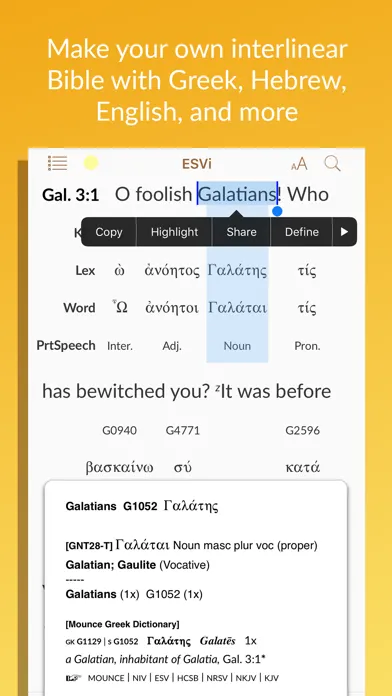
Accordance Bible Software is a desktop and mobile Bible study platform built around an original-language search engine. The core application is free to download - what you pay for is the library of texts and reference works that plug into it. That library spans English translations, the Hebrew Bible (BHS, BHQ), the Greek New Testament (NA28, UBS5, SBLGNT), the Septuagint, Latin Vulgate, Targums, Dead Sea Scrolls, classical and patristic Greek, plus the major lexica, grammars, commentaries, and journals.
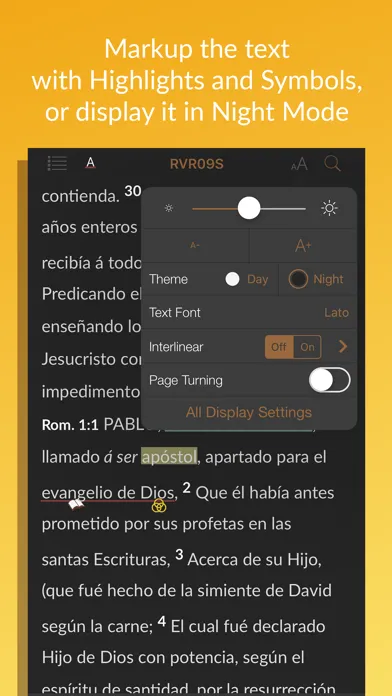
Originally a Mac-only product, Accordance now runs on macOS, Windows, iOS, iPadOS, and Android, with libraries synced across devices. The desktop apps are where the real work happens - the mobile apps are companion tools for reading and lightweight search on the go. It is owned and developed by Oak Tree Software, an independent company that has shepherded the product continuously since 1988.
Why serious students choose Accordance
The single biggest practical difference between Accordance and almost every other Bible study app is the search engine. Accordance treats the biblical text as a queryable database - you can ask it to find every imperfect verb form of a specific root within five words of a particular noun in the Pentateuch, and it will return the hits before you finish blinking. The query language is compact, learnable, and expressive in a way that takes a few weeks to fully appreciate.
That speed compounds across every workflow. Word studies that would take twenty minutes in a less precise tool resolve in seconds. Comparing how a Hebrew construction is rendered across the Septuagint and the Vulgate becomes a single search rather than a research project. For people who actually work in the original languages on a recurring basis - translators, exegetes, dissertation writers - that compounding speed is the entire reason Accordance has kept its loyal academic base for three decades.
Fast original-language search syntax: the scholar's search engine for the Bible
Accordance's search language is its calling card. You can search by lemma (the dictionary form of a word), by inflected form, by morphological tag (every Qal perfect 3rd masculine singular, for example), by syntax, or by any combination of those joined with proximity operators. The syntax is short - an asterisk for wildcards, an at-sign for tagged words, brackets for grouping - and once you learn the basic operators you can build genuinely sophisticated queries from the keyboard without ever opening a dialog box.
This sounds like a small thing. In practice it's transformative. A Greek scholar can find every participle governing a particular preposition in the Pauline corpus in a single line. A translator working in Genesis can pull every clause where the same Hebrew verb is used with a divine subject. The engine is fast enough that you start asking questions you wouldn't have bothered asking in a slower tool, and that changes the quality of the work that comes out the other side. It's the reason "the scholar's search engine for the Bible" is not just marketing.
Diagramming and parallel pane layouts: visual exegesis built in
Accordance ships with a sentence diagramming tool that lets you drag clauses and phrases into a syntactic tree - useful for teaching, for sermon preparation, and for the kind of careful clause-by-clause analysis that exegetical commentaries are built on. Diagrams can be saved, exported, and reused. Alongside the diagrammer, the parallel pane system lets you stack any number of texts side by side, locked to the same reference: BHS on the left, the Septuagint next to it, NA28 (where applicable), your preferred English translation, a critical apparatus, and a lexicon pane all scrolling together.
The parallel pane layouts are the everyday workhorse. Most serious users build a couple of custom workspaces - one for Old Testament exegesis with BHS, LXX, an English translation, HALOT, and a commentary pane; another for New Testament work with NA28, an English translation, BDAG, and a critical apparatus - and switch between them with a keystroke. It is, genuinely, the layout system that respects your work. Once you have it tuned, you stop thinking about the software and start thinking about the text.
The academic library ecosystem: BHS, NA28, BDAG, HALOT, and the reference shelf
The other reason Accordance has held its ground against larger competitors is the depth of its academic library. The standard critical editions of the Hebrew Bible (BHS, with BHQ fascicles as they release) and the Greek New Testament (NA28, UBS5, SBLGNT) are all here, fully tagged and searchable. The major lexica - BDAG for New Testament Greek, HALOT and DCH for Biblical Hebrew, LSJ for classical Greek, Jastrow for rabbinic Hebrew and Aramaic - are available as modules. So are the heavyweight theological dictionaries (TDNT, TDOT, NIDOTTE, NIDNTTE), the Anchor Yale Bible commentary set, the International Critical Commentary, and a broad selection of journals and monographs.
You buy modules à la carte, which is the model that respects your budget if you know what you actually need. A graduate student in Old Testament can build a focused stack - BHS, HALOT, DCH, a couple of grammars, a working set of commentaries - without paying for a thousand volumes of Reformed systematic theology they'll never open. Most users do not need the largest collection on the price list. The Original Languages bundle plus a few targeted additions covers the work for years.
Pricing
Starter Collection
~$200 one-time
Entry-level English bundle - a few translations, a basic dictionary, and the core engine. Good for evaluating the app before committing.
Original Languages bundle
~$500-$1,500 one-time
Adds Hebrew Bible (BHS), Greek New Testament (NA28 or UBS5), parsed morphology, BDAG, HALOT or DCH, and a working set of grammars.
Academic / Master collections
~$2,000-$5,000+ one-time
The serious scholar's stack - critical apparatuses, Anchor Yale Bible, ICC, TDNT/TDOT, Dead Sea Scrolls, Septuagint critical editions, and broad commentary sets.
Accordance Subscription
From ~$9.99/mo (tiered)
The newer subscription option - rent rather than own access to tiered libraries. Tiers expand to include academic-level resources at higher monthly prices.
Accordance pricing has two shapes. The traditional model - the one most longtime users know - is buy-once, own-forever modules. You pay for a starter collection (around $200), then add individual resources or pre-built bundles as your needs grow. Modules you buy are yours; they keep working even if you never upgrade the core app again.
The newer Accordance subscription is a rent-not-own option, tiered roughly from around $9.99/month at the entry level up to higher tiers that include academic-level libraries. The subscription is appealing if you want to spread the cost or sample a much larger library than you'd buy outright. It is less appealing if, like most longtime Accordance users, you treat your library as a permanent reference shelf.
The Original Languages bundle is the bestValue inflection point for serious students. It puts BHS, NA28 (or UBS5), parsed morphology, BDAG, HALOT (or DCH), and a starter set of grammars on your desk for a price that - once amortized over a few years of seminary or pastoral work - is meaningfully less than a comparable Logos stack.
The full academic and master collections cross $2,000 and can run past $5,000 once you add every critical apparatus, journal package, and major commentary set. Most users do not need anything close to that. Buy the engine, buy the bundle that matches the languages and traditions you actually work in, and add modules as specific projects demand them.
Where Accordance Bible Software falls behind
No first-party AI assistant (yet). Logos has shipped generative-AI features inside the app for a year now - sermon outlining, smart summaries, AI-assisted search. Accordance is more cautious here, and as of writing the AI surface inside the app is much thinner. For a scholar that's often a feature, not a bug; for a pastor looking for AI-assisted prep, it's a real gap.
Smaller popular-level catalog. Accordance carries the academic heavyweights, but Logos has a deeper bench in devotional commentaries, study Bibles, sermon illustration libraries, and contemporary popular-level theology. If your weekly work leans toward sermon prep rather than exegesis, Logos's catalog reaches further.
Modular pricing can confuse newcomers. Walk into Logos and you buy a "base package." Walk into Accordance and you assemble a library. The à la carte approach is the right model if you know what you want - and the wrong model if you don't. The Accordance team has gotten better at recommending starter bundles, but it's still more work to figure out what to buy.
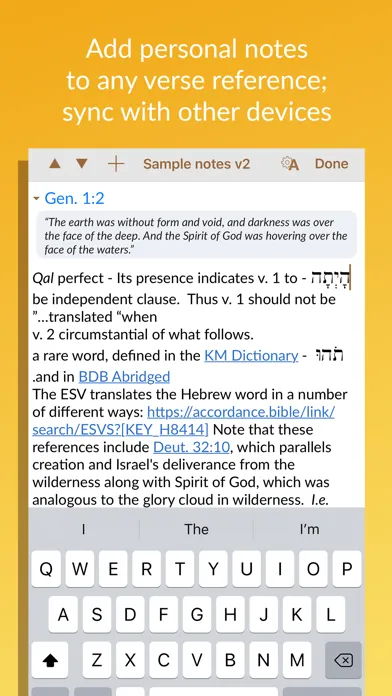
Mobile apps lag the desktop. The iOS and Android apps are competent for reading, searching, and reviewing notes, but the heavy original-language work - complex morphological queries, multi-pane diagramming, custom workspaces - really lives on the desktop. If you want a tablet-first experience, Logos's mobile app is more capable.
Accordance vs. Logos vs. e-Sword
These three sit at the three corners of the serious Bible study software market. Logos is the broadest - biggest catalog, most polished sermon and devotional tools, full AI integration, and a base-package model that gets you a usable library on day one. Accordance is the most academic - leaner library, faster engine, original-language-first design, and a long history of being the platform working scholars and translators actually keep open. e-Sword is the free option - a Windows-first Bible study app with a large free library and inexpensive paid modules, popular with lay students and pastors on tight budgets.
Different strengths. Logos is better at sermon and devotional workflows and has the deepest catalog (popular commentaries, study Bibles, AI features, integrated journals). Accordance is better at original-language work and search speed (BHS, NA28, BDAG, HALOT, parsed morphology, the fastest query engine in the category). e-Sword is better at price (a serious starter library for free, with paid add-ons usually a fraction of comparable Accordance or Logos modules).
If you do exegetical work in Hebrew or Greek every week - especially on a Mac - Accordance is hard to beat. If you do mostly English-language sermon prep and want one app that covers commentary, illustration, devotional, and AI assistance, Logos is the better all-in-one. If you want to start free and only pay for what you need, e-Sword is the gateway. None of the three is the wrong choice; they just optimize for different kinds of study.
The bottom line
Accordance is not the right choice for everyone. If you want a casual reading app or a sermon-prep one-stop, look elsewhere. But if your work involves the original languages - if you spend time in BHS or NA28, if you cite BDAG or HALOT from memory, if you want the fastest morphological search engine in the category running on a Mac that still feels like a Mac - Accordance has been the thoughtful scholar's answer for nearly forty years, and the 2026 version is the best it has ever been. Real gaps in the popular-level catalog and AI integration, but they're worth knowing about going in rather than dealbreakers.
Alternatives to Accordance Bible Software
 Logos Bible SoftwareThe broader of the two majors - bigger catalog, deeper popular-level resources, polished sermon tools, and full AI integration. The default choice if you want one app that does everything.
 e-SwordThe free Bible study app that punches well above its price. Large free library, inexpensive paid modules, Windows-first with Mac and mobile versions. The gateway for budget-conscious students.
 Olive TreeMobile-first Bible study app with a clean reading experience and a large pay-per-resource commentary store. Lighter than Accordance, but better as an everyday reader on phone and tablet.
 Blue Letter BibleFree Bible study app and website with Strong's tagging, interlinears, and a respectable commentary library. The best free entry point for English readers who want to peek into the original languages.
Frequently asked questions
Is Accordance still Mac-only?
No - that was true for the first two decades. Accordance now runs on macOS, Windows, iOS, iPadOS, and Android, with a shared library across devices. The Mac version still has the deepest polish (it's where the app was born), but the Windows version is fully featured and stable.
How does Accordance pricing actually work?
The core app is a free download. You pay for resources - either as individual modules, as pre-built bundles (Starter, Original Languages, Discoverer, Master, etc.), or via the newer Accordance subscription. Modules you buy outright are yours permanently. The subscription rents access to tiered libraries on a monthly or annual basis.
Accordance or Logos for seminary?
Both work well. Accordance is generally preferred for original-language exegesis (faster search, BHS/NA28/BDAG/HALOT are all first-class) and is especially popular with Mac users. Logos is generally preferred for breadth (more commentaries, study Bibles, sermon tools, AI features). Many seminarians end up owning both eventually; if you can only buy one and you're doing serious Hebrew or Greek work, Accordance is hard to beat.
Do I need the most expensive bundle?
No. Most users do not need the master collection. The Original Languages bundle plus a few targeted additions (the lexica and commentaries you actually use) is enough for years of serious work. Buy the engine, buy the bundle that matches the languages and traditions you actually work in, and add modules as projects demand them.
Is there a free trial?
You can download the core Accordance app for free and try it with a small starter set of resources. To do real work you'll need to buy at least one bundle or start a subscription. Accordance also runs frequent sales - it's worth waiting for one rather than paying full price on a large bundle.
How good are the Accordance mobile apps?
Good for reading, searching, and reviewing your notes on the go. Less ideal for the heavy original-language work that the desktop app handles - complex morphological queries, multi-pane diagramming, and custom workspaces really live on macOS or Windows. Treat the mobile apps as companions rather than replacements.
Does Accordance have AI features?
As of writing, Accordance's in-app AI surface is intentionally thinner than Logos's. The team has been cautious about generative-AI integration, and many of the AI features competitors offer are not yet (or are only lightly) present in Accordance. For a working scholar that's often a feature rather than a bug, but it is a real gap if you specifically want AI-assisted sermon prep.
Sources & further reading
More Bible Study Software
 VerseLink BibleVerseLink Bible keeps Scripture, sermon notes, highlights and original-language helps entirely on your device with no account, tracking, ads or subscription—but local-first privacy makes manual backup your responsibility.
 Ezra Bible AppA serious free, open-source study workspace built around topical verse collections, notes and the SWORD module ecosystem, now spanning desktop and mobile—but resource licensing varies, sync depends on Dropbox, and its 2022 privacy template contradicts the current App Store disclosure.
 Rava: Discover God’s StoryA free, multilingual facilitator that lets almost anyone press play and guide a Discovery Bible Study with little preparation—excellent for reproducible group participation, but not a replacement for wise leadership, contextual interpretation or a modern privacy policy.
 ARMA CoursesARMA makes serious Bible and theology teaching approachable through short, energetic courses—valuable for guided learners, but narrower and less transparent than a seminary library.
 Storyverse InstituteStoryverse makes Bible, theology, soul care and ministry training approachable through 200+ videos, community and cohorts—but its age, collection and deletion disclosures conflict too sharply for informed enrollment.
 The Word One to OneA polished, completely free guide for reading John and Acts with a friend—excellent for a trusted conversation, but narrow in scope and incomplete on app privacy and safeguarding.