- Starting price
- Free
- Free tier
- Yes
- Platforms
- Windows · macOS · iOS · iPad (Android via third party)
- Developer
- Rick Meyers
- Launched
- 2000
- Updated
- May 24, 2026
The verdict
e-Sword is the free-software grandparent of digital Bible study - homely UI, encyclopedic free library, and a premium module store that costs a fraction of Logos. Not pretty, but unbeatable on price per usable resource.
Try e-Sword ↗Opens e-sword.net
e-Sword has quietly become the favorite of two very different groups: bivocational pastors who refuse to pay Logos prices, and lifelong Bible students who learned the software in the early 2000s and have no reason to leave. Rick Meyers shipped the first version in 2000 as a one-man labor of love, and somewhere past 40 million downloads later it is still being maintained, still free at the core, and still - in 2026 - one of the most generous deals in the entire Bible-software category.
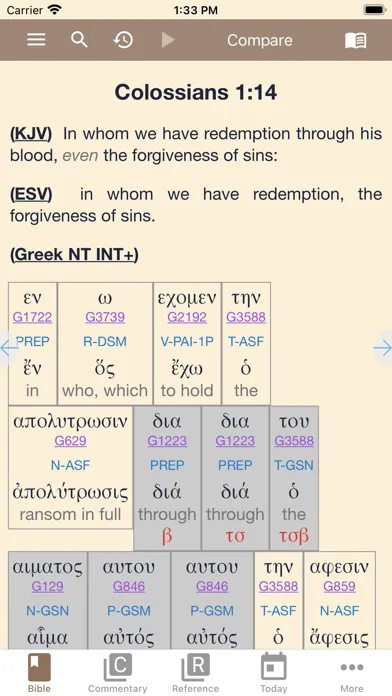
It does not look modern. It does not sync to your phone the way a cloud app does. It does not hold your hand through a guided study path the way a polished mobile app might. What it does is hand you a desktop window stacked with parallel translations, classical commentaries, Strong's numbers, Hebrew and Greek lexicons, maps, and reference works - most of them free, all of them searchable, all of them cross-linked.
The single biggest practical difference between e-Sword and the slicker apps is that e-Sword treats your study like a workspace, not a feed. You open windows. You pin a commentary. You drop a lexicon next to your translation. You build the layout you want and you keep it. For a certain kind of student - the kind who actually sits down with the text for an hour - that workflow is the whole reason the program has survived a quarter century of competition.
✓ The good
- Genuinely free core - the base install ships with KJV, ASV, classical commentaries (Matthew Henry, Gill, Clarke, Jamieson-Fausset-Brown), Strong's, and Easton's Bible Dictionary
- Cross-window study layout - parallel Bibles, commentaries, and lexicons all sync to the same verse so a click moves everything at once
- Premium modules priced like apps, not subscriptions - most paid translations and commentaries land in the $10-$30 range as one-time buys
- Strong's, Greek/Hebrew lexicons, and morphology built in at no charge - a feature Logos charges hundreds for
- Massive third-party module ecosystem - decades of user-built study Bibles, sermon collections, and commentaries in the e-Sword format
- Tiny footprint and fully offline - runs on the cheapest Windows laptop and never asks for an internet connection after install
- Mac (e-Sword X) and iOS versions exist for users who left Windows behind, even though the Windows build is the flagship
✗ Watch out
- UI looks like Windows XP - toolbar buttons, mid-2000s icons, no dark-mode polish anywhere (yet)
- Newer translations cost money - the NIV, ESV, NASB, CSB, and NLT are paid modules, not free downloads
- Mac and iOS versions are technically separate products with smaller libraries - module compatibility is not one-to-one
- No real cloud sync - your notes, highlights, and layouts live on the machine where you installed them
- Android is not officially supported - the most common workaround is the third-party "MySword" app, which is similar but not the same
- No AI assistant, no integrated sermon-builder, no modern collaboration features - this is a study workbench, not a productivity suite
Best for
- Bivocational pastors and lay teachers on a tight software budget
- Long-form Bible students who want desktop windows, not a phone feed
- Anyone who wants Strong's and Greek/Hebrew tools for free
- Users who prefer to own modules outright instead of renting a subscription
Avoid if
- You need pixel-perfect mobile sync across every device
- You want a modern, mobile-first reading experience
- You need the NIV, ESV, and NASB included out of the box
- You expect AI search, sermon assistants, or guided study paths
What e-Sword is
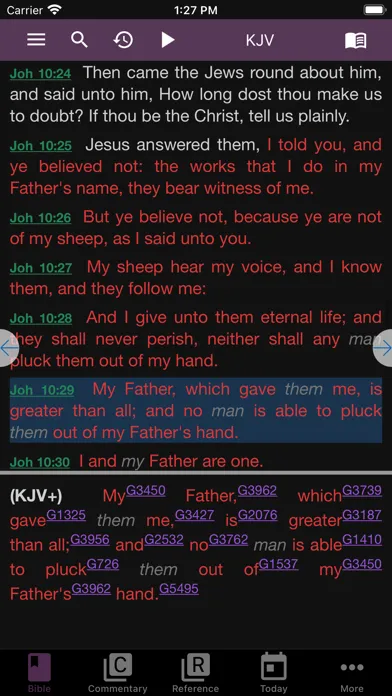
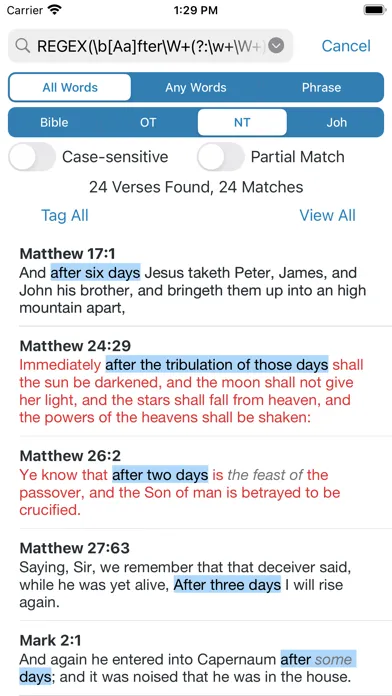
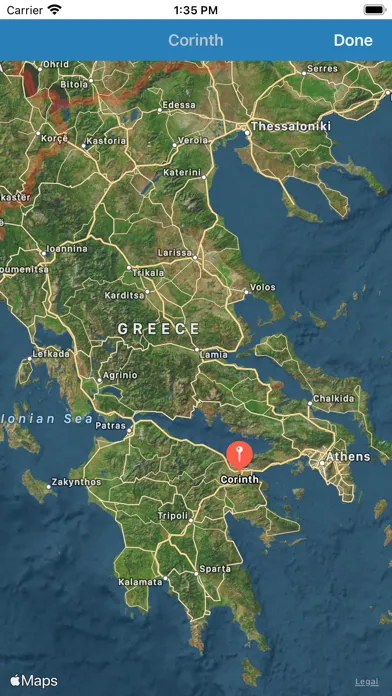
e-Sword is a free desktop Bible study application for Windows, with separate Mac (e-Sword X) and iOS builds that share the brand and most of the philosophy. The core install gives you public-domain translations, a stack of classical commentaries, Strong's numbers tied to Hebrew and Greek lexicons, a Bible dictionary, basic maps, and a verse-linked multi-window layout. From there, a built-in module download manager lets you add free third-party resources or purchase premium modules à la carte.
Functionally, it sits between a single-purpose Bible reader (YouVersion, Olive Tree) and a full academic library platform (Logos, Accordance). It is meant for people who actually study - pastors writing sermons, teachers preparing lessons, students working a passage in the original languages - and who want their tools sitting in a workspace on a real screen instead of scrolling on a phone.
Why budget-conscious pastors keep choosing e-Sword
Most digital Bible-study tools have drifted toward subscription pricing and cloud lock-in. e-Sword has stubbornly refused. The free download is still genuinely free - not a trial, not a feature-limited demo, not a freemium funnel - and the paid modules are still one-time purchases at app-store prices rather than $40-a-month library subscriptions. For a small-church pastor preparing forty-eight sermons a year on no software budget, that is the entire pitch.
The second reason it sticks: the classical commentary set in the free install is, by itself, a complete study library. Matthew Henry, John Gill, Adam Clarke, and Jamieson-Fausset-Brown together give you four full verse-by-verse commentaries on every chapter of the Bible, all cross-linked to whichever translation you have open. Add Strong's and a Greek/Hebrew lexicon - also free - and you have a working seminary-grade reference desk before you have spent a dollar.
The free core library: classical commentaries and Strong's done right
Out of the box, e-Sword installs with the KJV and ASV, Strong's Hebrew and Greek dictionaries, Easton's Bible Dictionary, Smith's Bible Dictionary in most installs, and a stack of public-domain commentaries - Matthew Henry's Complete, John Gill's Exposition, Adam Clarke's Commentary, Jamieson-Fausset-Brown, and Treasury of Scripture Knowledge for cross-references. The module download manager surfaces dozens more free resources the first time you open it: older translations like the Geneva and Webster, sermon collections from Spurgeon and Wesley, and a long tail of user-built study tools.
This sounds like a small thing. In practice it's transformative. A first-time user who installs the program on a Tuesday afternoon can be doing real verse-by-verse study with four cross-linked commentaries and full original-language lookups by Tuesday evening. The depth on offer for free is what made e-Sword the unofficial software of bivocational ministry in the 2000s, and it is still what makes the program impossible to dismiss in 2026.
Premium modules: the à la carte alternative to Logos
Where e-Sword charges money is the catalog of modern translations and contemporary commentaries - the things still under copyright. The NIV, ESV, NASB, CSB, NLT, NKJV, and dozens of academic and devotional commentaries are sold as individual modules through the in-app store, typically in the $10-$30 range as one-time purchases. Study Bibles, topical reference sets, and language tools sit in the same price band. The catalog is smaller than Logos and the production polish is lower, but the per-resource cost is a fraction of what you would spend in a comparable Logos package.
For the working pastor or serious lay student, this changes the economics of building a study library. Instead of committing to a multi-hundred-dollar base package and a monthly subscription on top, you buy the three or four modules you actually use - a modern translation, one commentary set you trust, maybe a Greek lexicon upgrade - and walk away owning them. Most users do not need a full premium library. They need two or three good additions to the free core, and e-Sword is the rare platform that still lets you buy exactly that.
Cross-window study layout: the workbench that survived the mobile era
e-Sword's main window is split into resizable panes - typically a Bible window, a commentary window, a dictionary window, and an editor window for notes - and every pane stays synced to whichever verse is selected. Click John 1:1 in the Bible pane and Matthew Henry, Strong's, and your lexicon all jump to John 1:1 simultaneously. You can open multiple translations side by side in the Bible pane, stack several commentaries as tabs in the commentary pane, and pin a Greek lexicon to whichever Strong's number you most recently clicked. The layout is saveable and the windows remember where you left them.
After a decade of mobile-first apps optimized for a thumb on a 6-inch screen, this kind of desktop workbench feels almost radical. For long-form study - the kind where you sit for an hour, work a passage, take notes, and walk out with a teaching outline - it is genuinely faster and clearer than swiping between tabs on a phone. The UI is dated, but the workflow it enables is the reason the program's diehards never left.
Pricing
e-Sword (free core)
Free
Windows desktop install with KJV, ASV, Strong's, Matthew Henry, Gill, Clarke, JFB, Easton's Dictionary, and basic maps. Enough to run a serious study without paying anything.
Premium modules (à la carte)
About $10-$30 each
One-time purchases for modern translations (NIV, ESV, NASB, CSB, NLT), academic commentaries, study Bibles, and reference works. Buy only what you need.
e-Sword X for Mac
Free (modules priced separately)
Native macOS build with its own module store. Smaller library than Windows and a different file format, but a real option for Mac-only users.
e-Sword HD / LT for iOS
Free app + IAP modules
iPhone and iPad versions for mobile reference. Useful as a companion to the desktop install rather than a replacement.
The free download really is free. No trial countdown, no nag screens, no feature-locked premium tier inside the installer - the base program ships with a working library you can use indefinitely without paying anything.
Paid modules are à la carte and one-time. Modern translations run roughly $10-$20 each, premium commentaries and study Bibles typically $15-$30, and language reference upgrades are in the same range. Bundles and sale pricing show up regularly in the in-app store.
There is no recurring subscription anywhere in the e-Sword ecosystem (as of writing). What you buy, you keep. That single fact is why the program is so often recommended to seminary students, small-church pastors, and anyone who has watched their Logos subscription line item creep upward year over year.
The Mac (e-Sword X) and iOS versions have their own module stores with their own pricing. Modules are not cross-licensed between the Windows, Mac, and iOS builds, which is worth knowing if you plan to use multiple platforms.
Where e-Sword falls behind
The interface. e-Sword still looks and behaves like a Windows-era desktop program - small icons, busy toolbars, no dark-mode finish, and a visual language that has not been refreshed in a long time. Functional, but ugly enough that some new users bounce before they ever see the depth underneath.
No real cloud sync. Your notes, highlights, bookmarks, and saved layouts live on the machine you installed them on. Workarounds exist (cloud-syncing the data folder, exporting and importing files), but there is nothing like the seamless multi-device sync that mobile-first apps treat as table stakes.
Mobile and Mac are second-class citizens. e-Sword X for Mac and e-Sword HD / LT for iOS exist and are maintained, but the module libraries are smaller, the file formats are not identical to the Windows build, and the experience is best understood as a companion to the desktop install rather than a peer.
No Android. Android users have to rely on the third-party MySword app, which uses a similar module philosophy and reads many of the same resources but is a separate product with its own catalog and its own quirks.
No AI, no sermon builder, no integrated workflow tools. If you are looking for a tool that drafts outlines, summarizes commentaries for you, or surfaces cross-references with a language model, this is not it (yet). e-Sword is a workbench. The work is still yours to do.
e-Sword vs. Logos vs. Blue Letter Bible
Different strengths. e-Sword is the free desktop workbench with a cheap à la carte module store. Logos is the premium academic platform with the deepest modern library, the best original-language tools, integrated sermon and search workflows, and a price tag to match. Blue Letter Bible is the free web-and-mobile reference site optimized for quick original-language lookups in a browser.
Logos is broader and more polished - a much larger catalog of modern resources, integrated AI search, sermon builder, factbook, and a serious learning curve. It is the right tool for full-time pastors, seminarians, and academics who will use the depth. Most lay students and bivocational pastors will not need 90% of what Logos offers, and the subscription pricing makes that gap painful.
Blue Letter Bible is faster for a quick word study - open a browser tab, click a Strong's number, read Thayer's in five seconds. It does not try to be a study workspace, and it does not have to be installed. e-Sword sits between the two: more depth than Blue Letter Bible, less polish and lower cost than Logos. For the budget-conscious pastor or the diligent lay teacher, that middle ground is exactly the right place to be.
The bottom line
e-Sword in 2026 is what it has always been: the free desktop Bible-study program that punches several weight classes above its price. The UI is dated, mobile sync is weak, and modern translations cost extra. But the free core library is genuinely complete, the premium modules are sold one time at fair prices, and the cross-window workbench is still the cleanest way to do long-form study on a real screen. If you are a pastor on a budget, a serious lay student, or anyone who remembers when software you bought stayed bought, e-Sword belongs on your machine.
Alternatives to e-Sword
 Logos Bible SoftwareThe premium academic library platform - far broader catalog, integrated AI search and sermon builder, but a serious subscription and learning curve.
 Blue Letter BibleFree web-and-mobile reference site built around fast original-language lookups. Great companion to e-Sword; not a workbench replacement.
 Bible HubFree browser-based study site with parallel translations, interlinears, and commentaries. Lighter than e-Sword, no install required.
 Olive Tree Bible AppFree mobile-first reader with paid commentary and resource IAPs. The closest modern alternative for users who want a tablet workflow.
Frequently asked questions
Is e-Sword really free?
Yes. The Windows download installs a fully working program with multiple translations, classical commentaries, Strong's, lexicons, dictionaries, and maps at no cost. The only things you pay for are optional premium modules - usually modern copyrighted translations and contemporary commentaries - and those are à la carte one-time purchases.
Does e-Sword work on Mac and iPhone?
Yes, but they are separate products. e-Sword X is a native macOS build with its own (smaller) module store. e-Sword HD and e-Sword LT are the iPad and iPhone versions. Modules are not cross-licensed between the Windows, Mac, and iOS builds, so plan accordingly if you use multiple platforms.
What about Android?
There is no official e-Sword build for Android. The most common workaround is a separate third-party app called MySword, which uses a similar module philosophy and can read many e-Sword-style resources, but it is not the same product and is not made by Rick Meyers.
How does e-Sword compare to Logos?
Logos has a much bigger catalog of modern academic resources, deeper original-language tools, AI search, a sermon builder, and a polished modern interface. It also costs hundreds of dollars upfront and often a monthly subscription on top. e-Sword gives you a smaller library and a dated UI, but the free core is genuinely usable and the premium modules are far cheaper. Pick Logos if you are a full-time pastor or academic; pick e-Sword if you want serious study without the budget.
Can I get the NIV or ESV in e-Sword?
Yes, as paid modules. The NIV, ESV, NASB, CSB, NLT, NKJV, and most modern English translations are available in the in-app module store, typically in the $10-$20 range as one-time purchases. The free install ships with the KJV and ASV by default.
Does e-Sword sync notes between devices?
Not natively. Your notes, highlights, and layouts are stored locally on whichever machine you installed the program on. Some users sync the e-Sword data folder through Dropbox or OneDrive as a workaround, but there is no built-in cloud-sync feature like you would find in a modern mobile app.
Is e-Sword still being updated?
Yes. Rick Meyers has maintained the program continuously since 2000, with regular point updates to the Windows build and active maintenance on the Mac and iOS versions. The release cadence is slow and the visual style has not been overhauled, but the software is not abandoned.
Sources & further reading
More Bible Study Software
 VerseLink BibleVerseLink Bible keeps Scripture, sermon notes, highlights and original-language helps entirely on your device with no account, tracking, ads or subscription—but local-first privacy makes manual backup your responsibility.
 Ezra Bible AppA serious free, open-source study workspace built around topical verse collections, notes and the SWORD module ecosystem, now spanning desktop and mobile—but resource licensing varies, sync depends on Dropbox, and its 2022 privacy template contradicts the current App Store disclosure.
 Rava: Discover God’s StoryA free, multilingual facilitator that lets almost anyone press play and guide a Discovery Bible Study with little preparation—excellent for reproducible group participation, but not a replacement for wise leadership, contextual interpretation or a modern privacy policy.
 ARMA CoursesARMA makes serious Bible and theology teaching approachable through short, energetic courses—valuable for guided learners, but narrower and less transparent than a seminary library.
 Storyverse InstituteStoryverse makes Bible, theology, soul care and ministry training approachable through 200+ videos, community and cohorts—but its age, collection and deletion disclosures conflict too sharply for informed enrollment.
 The Word One to OneA polished, completely free guide for reading John and Acts with a friend—excellent for a trusted conversation, but narrow in scope and incomplete on app privacy and safeguarding.